![enginehire logo thin dark 1.0.png]](https://learn.enginehire.io/hs-fs/hubfs/enginehire%20logo%20thin%20dark%201.0.png?height=40&name=enginehire%20logo%20thin%20dark%201.0.png)
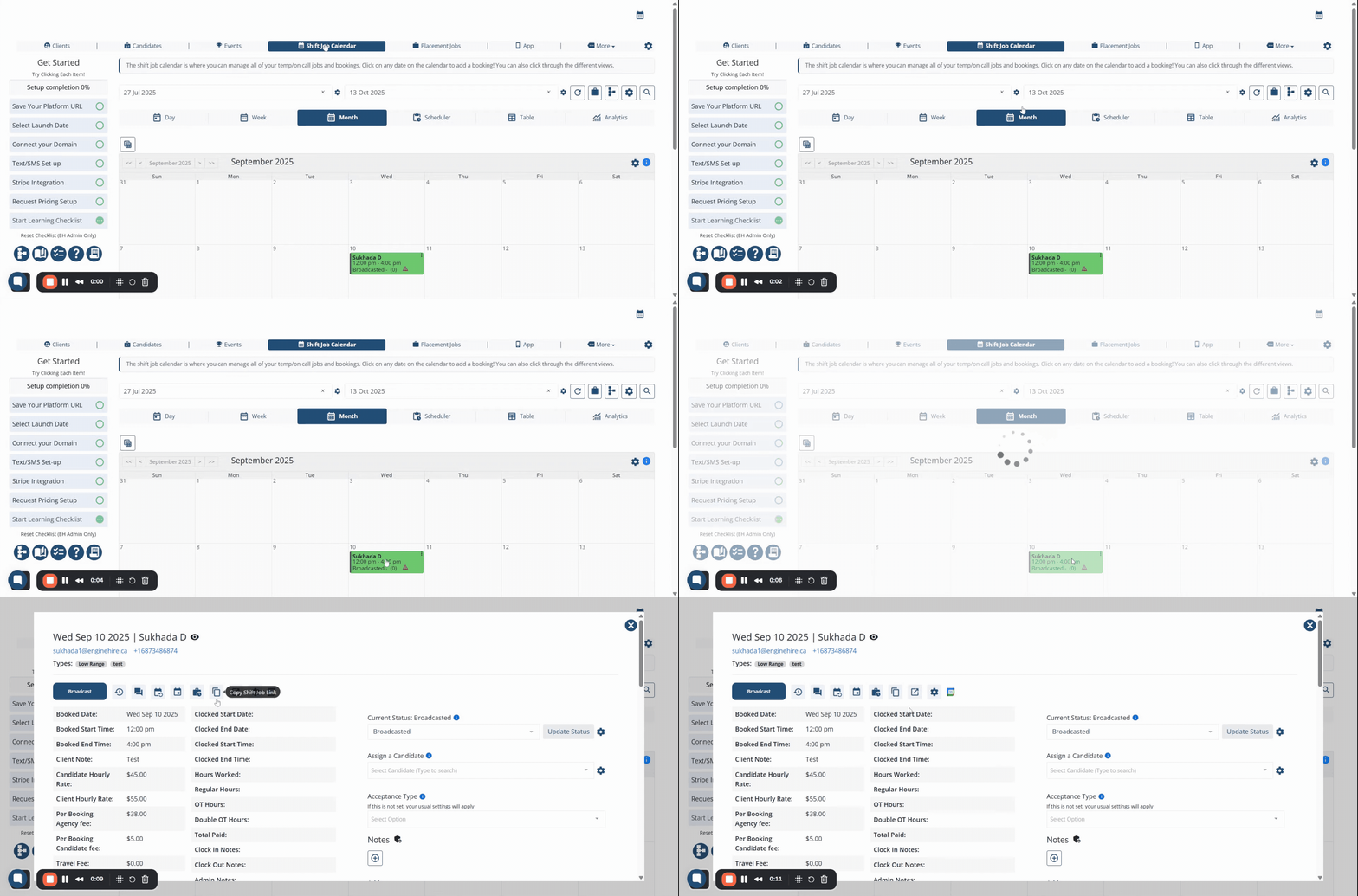
Shift Jobs: As you go through the steps below, use the looping image for guidance.
Step 1: Go to shift job calendar menu
Step 2: Click on any job you want to get the job link
Step 3: Look for the copy icon and click on it to get the link copied
Placement Job: Follow the steps below, use the looping image for guidance.
Step 1: Go to placement job menu
Step 2: Click on a link icon " " of a job you want to get the link
Step 3: Copy the job link from address bar of your web browser
.gif?width=688&height=366&name=Adobe%20Express%20-%20Enginehire%20-%2015%20September%202025%20(1).gif)
The following video is from a previous interface but the information is still accurate.