![enginehire logo thin dark 1.0.png]](https://learn.enginehire.io/hs-fs/hubfs/enginehire%20logo%20thin%20dark%201.0.png?height=40&name=enginehire%20logo%20thin%20dark%201.0.png)
1. When in a select client's admin view select Payment/Credits.
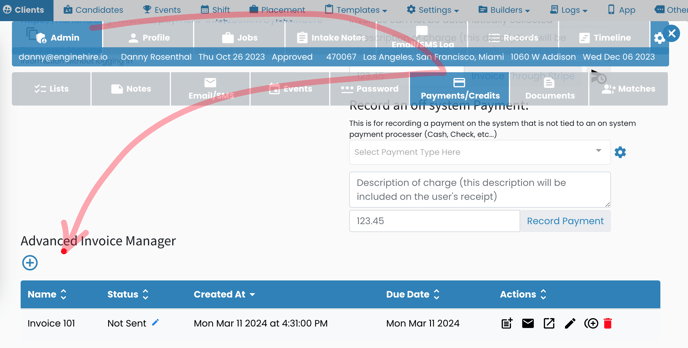
2. After creating an invoice with the Advance Invoice Manager select the Letter Icon.
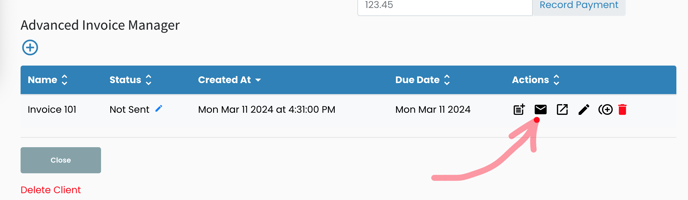
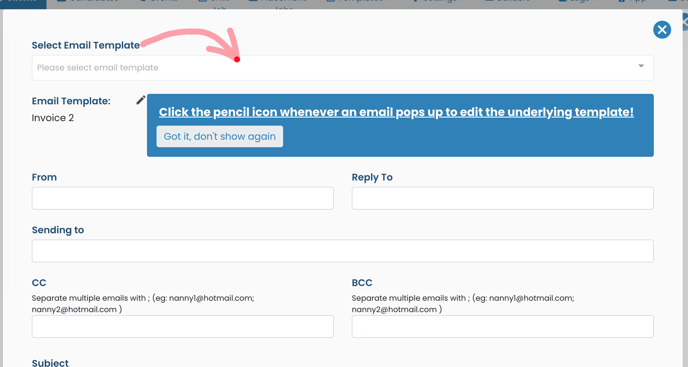
3. An email template will appear.
4. Use the Dropdown to select between different invoice emails.
1. When in a select client's admin view select Payment/Credits.
2. After creating an invoice with the Advance Invoice Manager select the Letter Icon.
3. An email template will appear.
4. Use the Dropdown to select between different invoice emails.