![enginehire logo thin dark 1.0.png]](https://learn.enginehire.io/hs-fs/hubfs/enginehire%20logo%20thin%20dark%201.0.png?height=40&name=enginehire%20logo%20thin%20dark%201.0.png)
Step 1: Go to placement jobs page
Step 2: Click on search icon and it will open search / filter section
Step 3: Click on Gear / Settings icon
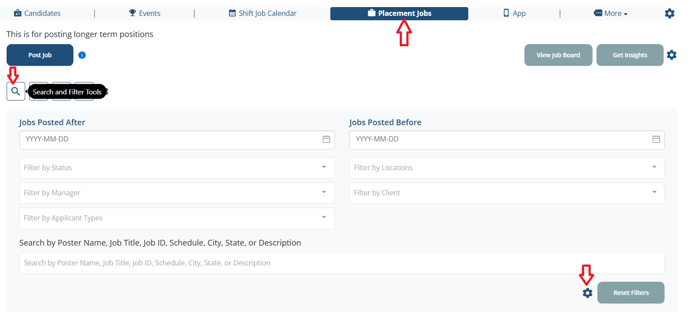
Step 4:
Add the fields in "Select fields for custom filter for placement jobs" and Save the Changes
- Here added a "Title" as custom field

Result:
Custom added field "Title" is available in search and filter section to filter the jobs

The following video is from a previous interface but the information is still accurate.