![enginehire logo thin dark 1.0.png]](https://learn.enginehire.io/hs-fs/hubfs/enginehire%20logo%20thin%20dark%201.0.png?height=40&name=enginehire%20logo%20thin%20dark%201.0.png)
Example – Terms and Conditions:
You can hyperlink the text "Terms and Conditions" so that when clicked, it opens your full Terms and Conditions in a new tab. After reviewing it, users can check a box confirming they’ve read and agreed to the terms.
Step 1:
Navigate to the section where you'd like to add the checkbox field.
Step 2:
Click "Add a new field" and select "Checkbox Condition" as the field type.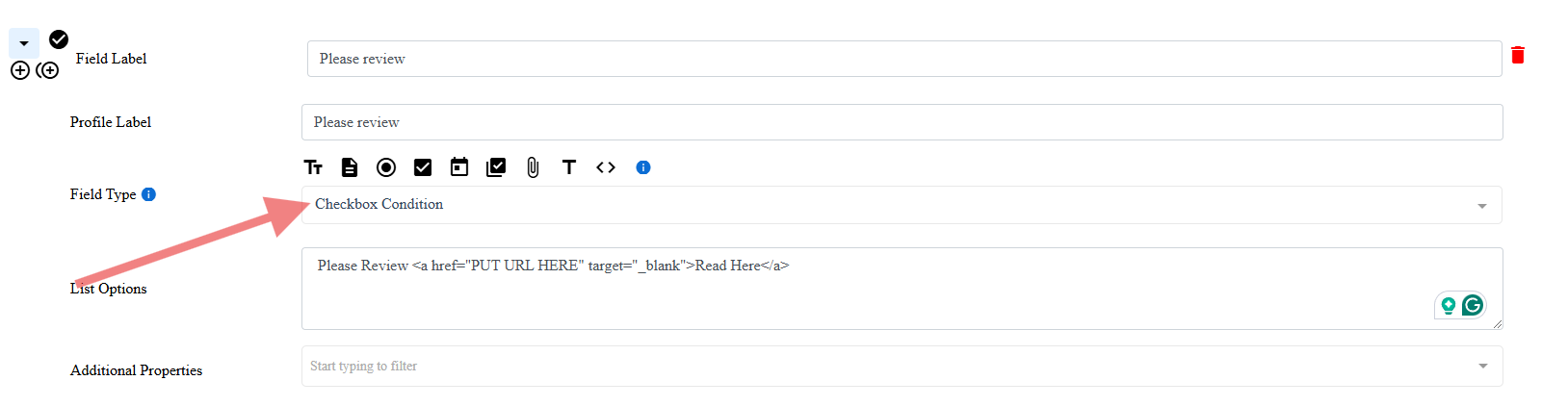
Step 3:
In the Field Label/Profile Label, enter the title or question you’d like to display (e.g., “Do you agree to our terms?”).
Step 4:
In the List Option field, paste the following code:
Please Review <a href="PUT URL HERE" target="_blank">Read Here</a>
Step 5:
Replace PUT URL HERE with the full link to your document (e.g., Terms and Conditions, Privacy Policy, etc.).
Customization Options:
-
You can change the text “Please Review” to any wording you’d like.
Example: “Please review our Terms and Conditions” -
You can also change “Read Here” to any clickable phrase you'd prefer.
Example: “View Document” or “Click to Read”
Example of a Completed Field: