![enginehire logo thin dark 1.0.png]](https://learn.enginehire.io/hs-fs/hubfs/enginehire%20logo%20thin%20dark%201.0.png?height=40&name=enginehire%20logo%20thin%20dark%201.0.png)
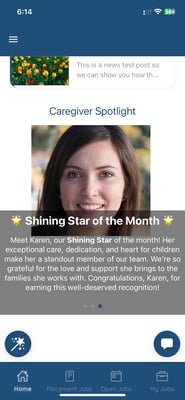
This is a great way to:
-
Showcase standout candidates to your clients
-
Motivate and recognize your candidates
-
Add a personal, engaging touch to your branded app
🔐 Note: This feature is only available to agencies using the Branded App.
🛠️ How to Set It Up
Step 1: Log In to Your Enginehire Dashboard
Step 2: Navigate to Candidate Spotlight
Go to the left-side menu and click:
More → Candidate Spotlight
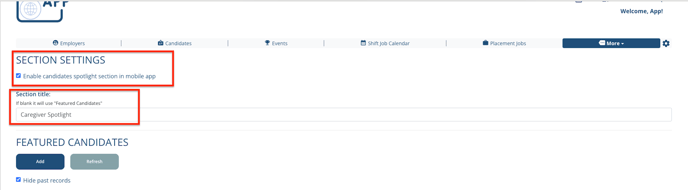
Step 3: Enable and Customize
-
Toggle the switch to enable Candidate Spotlight for the mobile app
-
You can optionally edit the title that appears in the app (e.g., “Nanny of the Month”)
Step 4: Add a New Spotlight Candidate
Click the “Add” button and fill in the following:
-
Candidate Name
-
Title (e.g., “Outstanding Caregiver - April”)
-
Start Date and End Date (controls how long the spotlight is visible)
-
User Type – choose who should see the spotlight (Clients, Candidates, or both)
Step 5: Submit
Once all fields are filled out, click “Submit”. Your selected candidate will now be featured on the app for the designated audience and timeframe!