![enginehire logo thin dark 1.0.png]](https://learn.enginehire.io/hs-fs/hubfs/enginehire%20logo%20thin%20dark%201.0.png?height=40&name=enginehire%20logo%20thin%20dark%201.0.png)
To bulk update the admin manager please follow the listed instructions,
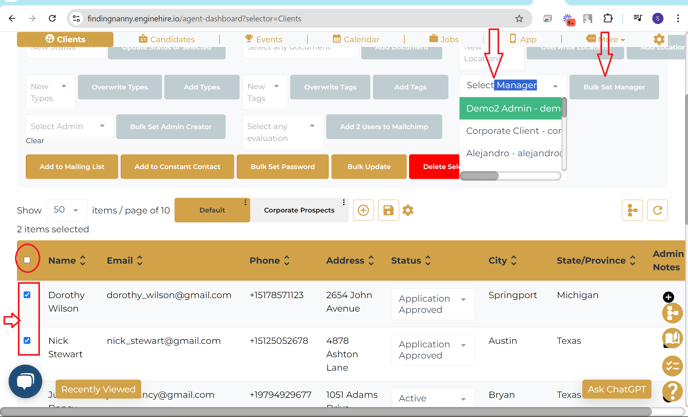
- Select the multiple clients that you would like to set the admin manager.
- To select all clients check the top checkbox marked in red circle in attached screenshot
- In the dropdown of admins select the required admin manager
- Click the button "Bulk Set Manager"
Please refer the attached screenshot for reference.