![enginehire logo thin dark 1.0.png]](https://learn.enginehire.io/hs-fs/hubfs/enginehire%20logo%20thin%20dark%201.0.png?height=40&name=enginehire%20logo%20thin%20dark%201.0.png)
1. Navigate to any Candidate profile, select the Profile tab, and navigate to the My Jobs section. Once in this tab, select the gear icon: 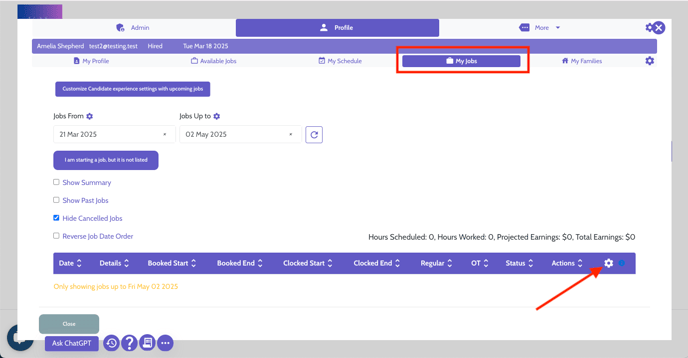
2. Select the Clock In/Out tab: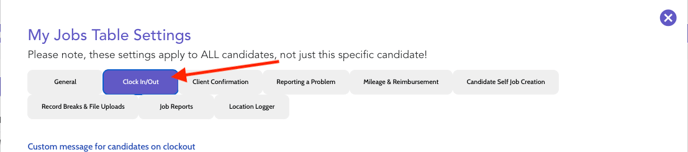
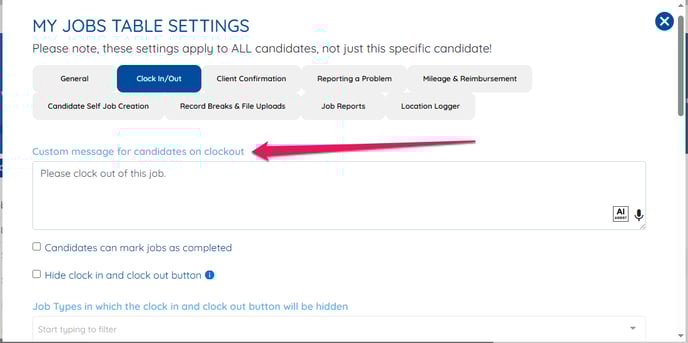
3. Click on Custom message for candidates on clockout.
1. Navigate to any Candidate profile, select the Profile tab, and navigate to the My Jobs section. Once in this tab, select the gear icon:
2. Select the Clock In/Out tab:
3. Click on Custom message for candidates on clockout.