![enginehire logo thin dark 1.0.png]](https://learn.enginehire.io/hs-fs/hubfs/enginehire%20logo%20thin%20dark%201.0.png?height=40&name=enginehire%20logo%20thin%20dark%201.0.png)
A Bright Horizons reservation can leave the portal at two points that matter to your team: before a caregiver was assigned, or after. A booking that disappears before anyone was booked usually needs no follow-up. A booking that disappears after you've scheduled a caregiver means someone is expecting to work a shift that no longer exists, and it may be chargeable under your cancellation policy.
Enginehire gives each of these its own shift job status so you can tell them apart at a glance and act on the ones that need it. This article explains both situations, what the default statuses are, and how to change them.
Bright Horizons calls these reservations; Enginehire calls the resulting record a booking or a shift job. They're the same thing.
The two situations
| What happened in the portal | Setting that controls it | Default status if you leave it empty |
|---|---|---|
| The reservation disappeared from the Available tab. Nobody had been assigned to it yet. | Status to update job to if it is removed from the available tab of BH portal | No longer available |
| The reservation disappeared from the Scheduled tab. A caregiver had already been assigned. | Status to update job to if it is removed from the scheduled tab of BH portal | Cancelled |
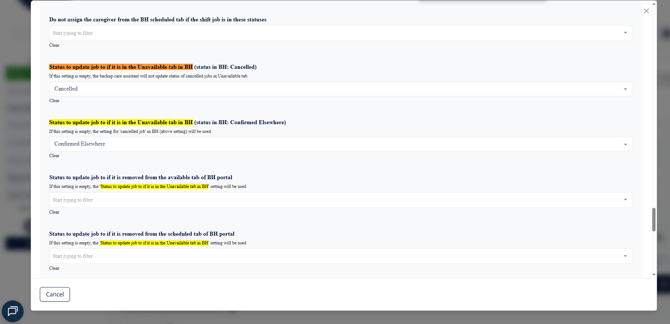
The Enginehire status names aren't fixed. Any shift job status you've created can be used for either setting, and if you'd rather use your own names, see Add and customize shift job statuses and colors.
Removed from the Available tab
A reservation leaves the Available tab for more than one reason. The family may have cancelled before anyone picked it up, another provider may have confirmed it, or Bright Horizons may have removed it. The portal doesn't reliably tell Enginehire which of these happened, so the assistant doesn't try to guess. It applies a single status, No longer available by default, that means exactly what it says: this booking is no longer yours to staff.
Because nobody was assigned, there's normally nothing to do. No caregiver needs to be told, and these bookings generally aren't chargeable. If you'd like these jobs out of the way, filter on this status and they'll be easy to find.
Removed from the Scheduled tab
This is the one to pay attention to. A reservation only reaches the Scheduled tab once a caregiver has been assigned, so if it disappears from there, the family has pulled a booking someone was planning to work. The assistant moves the job to Cancelled by default, and that status change is what drives the follow-up: the assigned caregiver is notified, and your cancellation policy can be applied if you've turned that on (see below).
Why the Unavailable tab is no longer used
Enginehire previously read the portal's Unavailable tab to tell a cancelled reservation apart from one marked Confirmed Elsewhere, and offered a separate status for each. The information shown in that tab has proven unreliable: reservations that were cancelled were appearing as Confirmed Elsewhere, and vice versa, which led to shifts being marked as confirmed with another provider when the agency had a caregiver assigned. Rather than apply statuses based on data that can't be trusted, the assistant no longer reads the Unavailable tab at all.
If your agency had a status configured for Confirmed Elsewhere, the assistant no longer applies it. Jobs that would previously have received that status now receive your Available-tab status instead (No longer available by default), since a booking confirmed elsewhere is, from your side, simply one that's no longer available to staff.
Where to find these settings
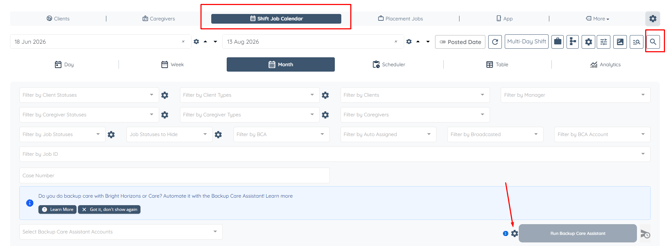
Both settings live in the backup care assistant settings window. To open it, see How to edit the backup care assistant settings. Scroll down past the field mappings and you'll find them together.
What happens if you leave one empty
Leaving either setting empty doesn't switch the behaviour off. The assistant falls back on the default for that setting: No longer available for reservations removed from the Available tab and Cancelled for reservations removed from the Scheduled tab. You only need to fill these in if you want a different status than the default.
Protecting a status you've already set
List of job statuses which will not be changed to the above status when the job is removed from the BH portal stops the assistant overwriting work you've already done.
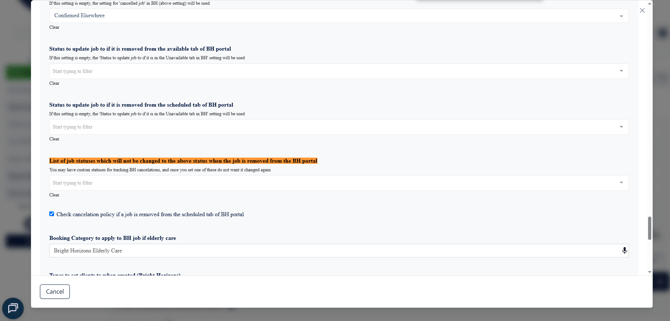
This matters if your team tracks portal cancellations with their own statuses. Say a coordinator has already reviewed a cancelled booking and moved it to a status of your own — add that status to this list and the assistant will leave it alone from then on, rather than resetting it the next time it checks the portal.
Cancellation policy
Check cancelation policy if a job is removed from the scheduled tab of BH portal applies your agency's cancellation policy when a scheduled reservation is pulled. This is what decides whether the cancellation is chargeable, which is why it applies to the Scheduled tab specifically — a booking that leaves before anyone was assigned generally isn't billable, while one pulled at short notice after a caregiver was scheduled often is.

If you use care.com
care.com handles this differently and has its own status for reservations that are no longer available. See Understanding the "No Longer Available" status for backup jobs.
Related
- Backup Care Assistant settings explained — every setting in this window
- How to edit the backup care assistant settings
- What to do if a Bright Horizons back up care job fails to assign
If this doesn't answer your questions you can always contact us by clicking here.