---
title: Email notification to send to candidate when a client cancels a shift job
description: If you need to notify candidates when a client cancels a shift job, you can customize the email notifications to ensure they are promptly informed.
---
[Skip to content](https://learn.enginehire.io/en/knowledge/email-notification-to-send-to-candidate-when-a-client-cancels-a-shift-job#main-content)
English
Show submenu for translations
[Contact us](https://learn.enginehire.io/en/knowledge/kb-tickets/new?hsLang=en) [Customer portal](https://learn.enginehire.io/tickets-view?hsLang=en)
![enginehire logo thin dark 1.0.png\]](https://learn.enginehire.io/hs-fs/hubfs/enginehire%20logo%20thin%20dark%201.0.png?height=40&name=enginehire%20logo%20thin%20dark%201.0.png)
- Home
- Products
- Pricing
- Blog
- Company
Open main navigation
Close main navigation
- Home
- Products
- Pricing
- Blog
- Company
- English
Show submenu for translations
- [Contact us](https://learn.enginehire.io/en/knowledge/kb-tickets/new)
- [Customer portal](https://learn.enginehire.io/tickets-view)
- Go to main page
Go to main page
Hello! You can find guides on how to do everything in Enginehire here. If you can't find what you are looking for or anything feels out of date, please contact us!
- There are no suggestions because the search field is empty.
1. [Enginehire Help Center](https://learn.enginehire.io/en/knowledge?hsLang=en)
2. [Templates & Communication](https://learn.enginehire.io/en/knowledge/templates-communication?hsLang=en)
# Email notification to send to candidate when a client cancels a shift job
## If you need to notify candidates when a client cancels a shift job, you can customize the email notifications to ensure they are promptly informed.
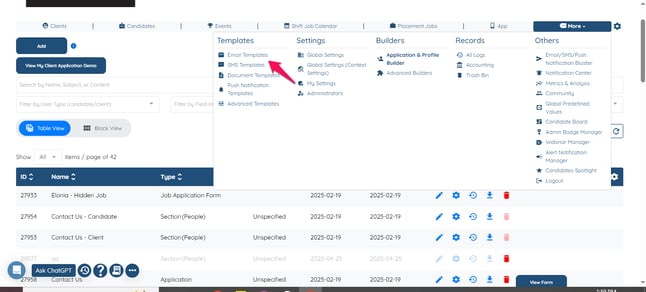
- Go to more and email template on the dashboard.
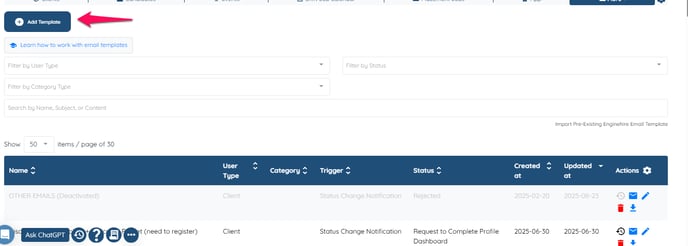
- Then Click on Add.
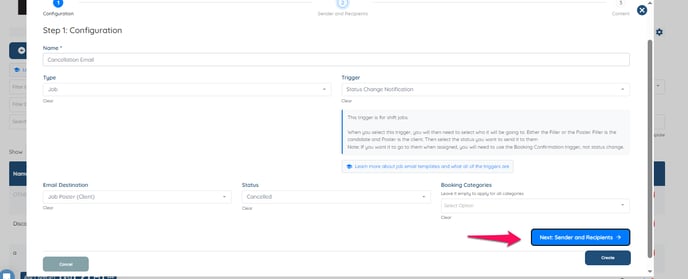
- Name the email template, then select types as job and then you can customized it whether it goes to client or candidate and then status should be Cancelled and then click Next: Sender and Recipients.
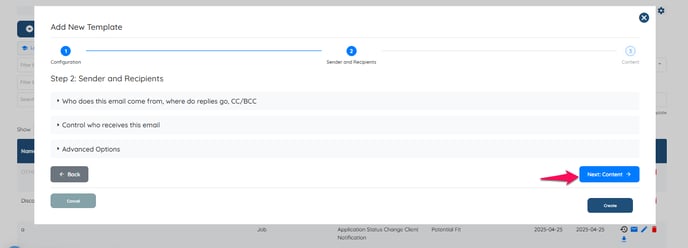
- Click Next if you do not want to use any of the option.
- Please note that you’ll need to enter the subject and email body yourself, and you can use the tags shown on the right-hand side to customize them as needed.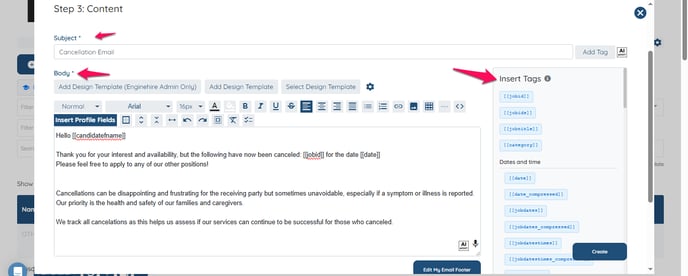
How it will work I have created a short video.
[If this doesn't answer your questions you can always contact us by clicking here](https://share.hsforms.com/1yIx2IRKyQQaVcMJW8kLbJg39wil).
- [Onboarding](https://learn.enginehire.io/en/knowledge/onboarding?hsLang=en)
- [Application Forms & Profiles](https://learn.enginehire.io/en/knowledge/application-forms-profiles?hsLang=en)
- [Templates & Communication](https://learn.enginehire.io/en/knowledge/templates-communication?hsLang=en#main-content)
- [Documents](https://learn.enginehire.io/en/knowledge/templates-communication?hsLang=en#documents)
- [Jobs](https://learn.enginehire.io/en/knowledge/jobs?hsLang=en)
- [Payments](https://learn.enginehire.io/en/knowledge/payments?hsLang=en)
- [Integrations](https://learn.enginehire.io/en/knowledge/integrations?hsLang=en)
- [App](https://learn.enginehire.io/en/knowledge/app?hsLang=en)
- [For Candidates & Clients](https://learn.enginehire.io/en/knowledge/for-candidates-clients?hsLang=en)
- [Backup Care](https://learn.enginehire.io/en/knowledge/backup-care?hsLang=en#main-content)
- [Instant Book](https://learn.enginehire.io/en/knowledge/backup-care?hsLang=en#instant-book)
- [Data Import & Export](https://learn.enginehire.io/en/knowledge/data-import-export?hsLang=en)
- [Reporting & Logs](https://learn.enginehire.io/en/knowledge/reporting-logs?hsLang=en)
- [Error](https://learn.enginehire.io/en/knowledge/error?hsLang=en#main-content)
- [Authentication](https://learn.enginehire.io/en/knowledge/error?hsLang=en#authentication)
- [Settings](https://learn.enginehire.io/en/knowledge/settings?hsLang=en)
- [Domain](https://learn.enginehire.io/en/knowledge/domain?hsLang=en)
- [Webinars and Training](https://learn.enginehire.io/en/knowledge/webinars-and-training?hsLang=en)
- [Ways to Grow and Make More Money](https://learn.enginehire.io/en/knowledge/ways-to-grow-and-make-more-money?hsLang=en)
- [Placements](https://learn.enginehire.io/en/knowledge/placements?hsLang=en#main-content)
- [Job Board](https://learn.enginehire.io/en/knowledge/placements?hsLang=en#job-board)
- [Enginehire Team Internal Videos](https://learn.enginehire.io/en/knowledge/enginehire-team-internal-videos?hsLang=en#main-content)
- [Settings](https://learn.enginehire.io/en/knowledge/enginehire-team-internal-videos?hsLang=en#settings)
- [AI](https://learn.enginehire.io/en/knowledge/ai?hsLang=en)
- Home
- Products
- Pricing
- Blog
- Company
[](https://enginehire.io)
Enginehire Help Center
Copyright © 2026, Enginehire Inc.