![enginehire logo thin dark 1.0.png]](https://learn.enginehire.io/hs-fs/hubfs/enginehire%20logo%20thin%20dark%201.0.png?height=40&name=enginehire%20logo%20thin%20dark%201.0.png)
Let’s get started 🚀
Step 1: Log in to your agent dashboard and click More > Administrators, as shown in the screenshot below. 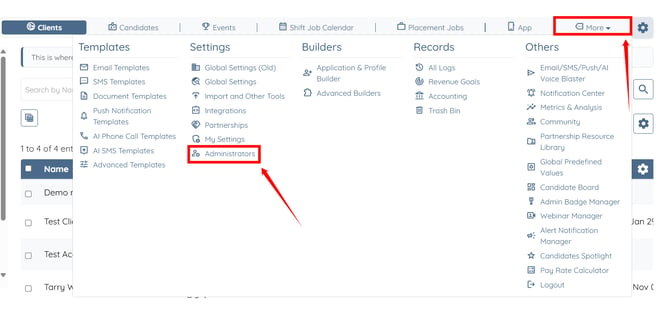
Step 2: Click the gear icon next to the admin for whom you want to create an email footer. 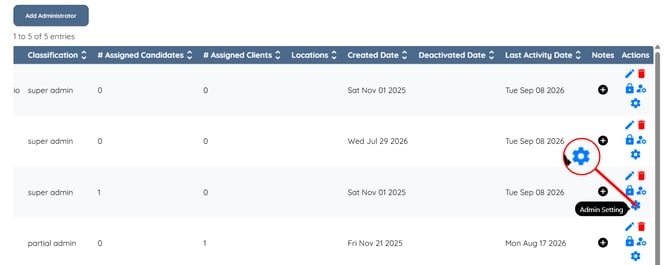
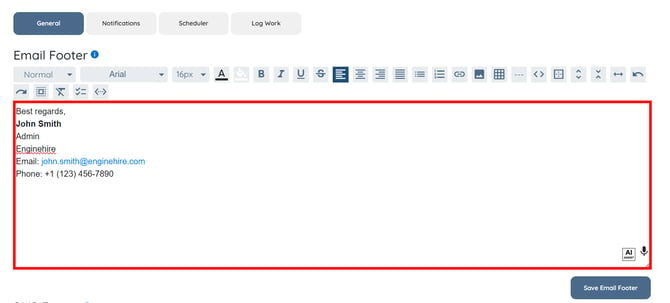
Step 3: Enter the content for the admin’s email footer.
You may also make use of the AI ASSIST feature to enhance the quality of the text. To learn how to use it, refer to the Use AI ASSIST Feature document.
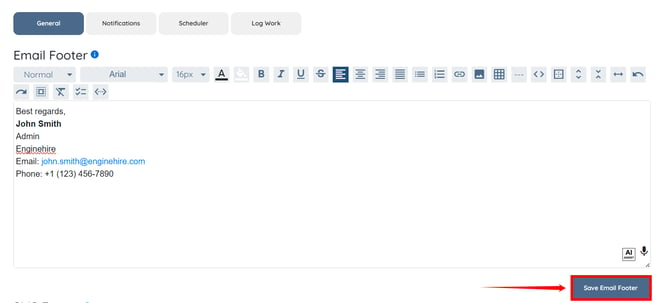
Step 4: Click Save Email Footer button to save the email footer for the selected admin.