![enginehire logo thin dark 1.0.png]](https://learn.enginehire.io/hs-fs/hubfs/enginehire%20logo%20thin%20dark%201.0.png?height=40&name=enginehire%20logo%20thin%20dark%201.0.png)
Let’s get started 🚀
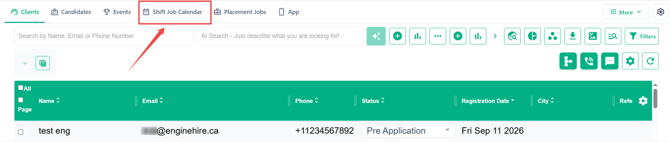
Step 1: From the dashboard, navigate to the Shift Job Calendar.
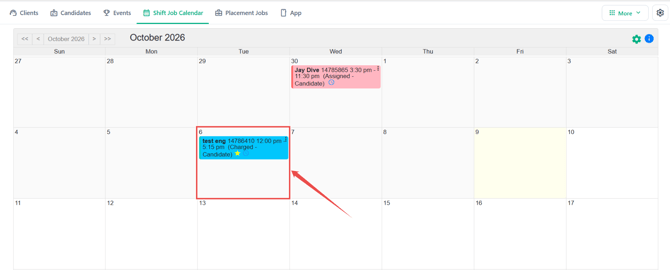
Step 2: Select the specific Shift job from the list that has a cleared payment.
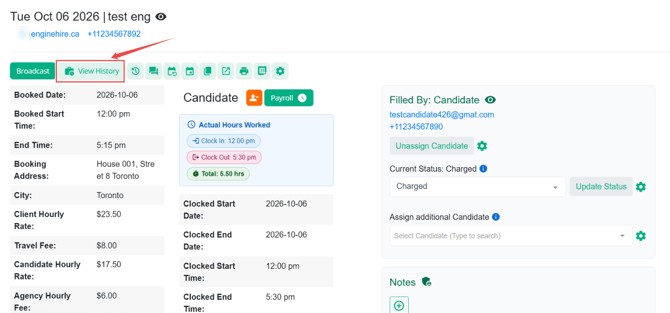
Step 3: Navigate to the View History tab.
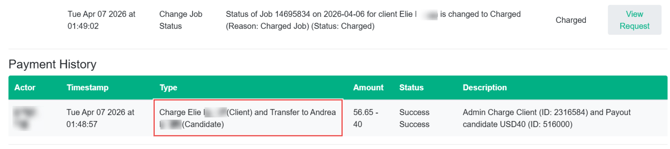
Step 4: Locate the Payment History area by scrolling down.
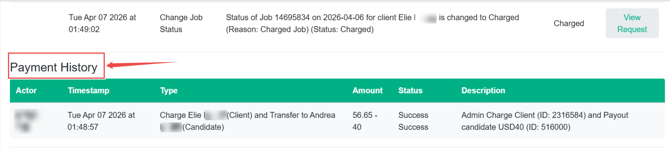
You are all set! The full names of both the client and the candidate are displayed within the Type section.
If you need any further assistance, feel free to contact our support team by clicking here: https://share.hsforms.com/1yIx2IRKyQQaVcMJW8kLbJg39wil