![enginehire logo thin dark 1.0.png]](https://learn.enginehire.io/hs-fs/hubfs/enginehire%20logo%20thin%20dark%201.0.png?height=40&name=enginehire%20logo%20thin%20dark%201.0.png)
Let’s get started 🚀
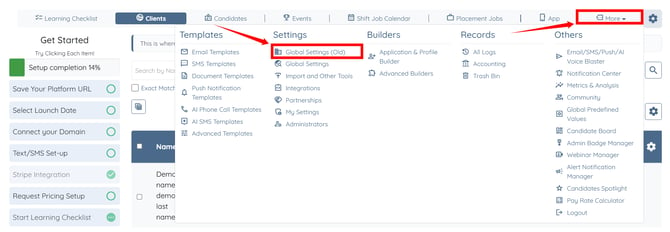
Log in to your agent dashboard and click More > Global Settings (Old) as shown in the screenshot below.
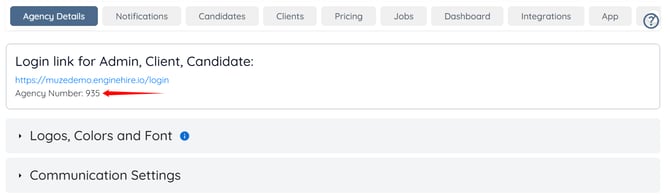
You can view your agency number under the Login link for Admin, Client, Candidate under the Agency Details tab.
Log in to your agent dashboard and click More > Global Settings (Old) as shown in the screenshot below.
You can view your agency number under the Login link for Admin, Client, Candidate under the Agency Details tab.