![enginehire logo thin dark 1.0.png]](https://learn.enginehire.io/hs-fs/hubfs/enginehire%20logo%20thin%20dark%201.0.png?height=40&name=enginehire%20logo%20thin%20dark%201.0.png)
Let’s get started 🚀
Step 1: Log in to your agent dashboard, and click More > All Logs as shown in the screenshot below.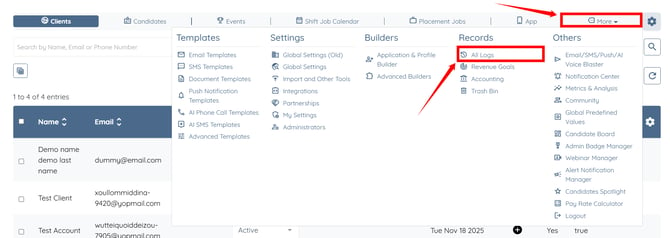
Step 2: Click the AI Voice Call Logs option to view the AI voice call records. 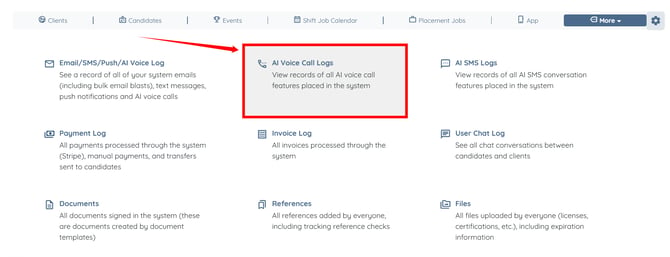
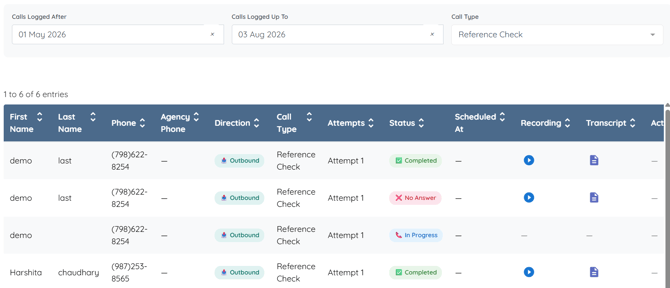
Step 3: Use the following filters to narrow the AI Voice Call Logs based on your requirements.
|
S. No. |
Field |
Description |
|
1 |
Calls Logged After |
Select the start date to display AI voice call logs created on or after the specified date. Leave this field blank to include logs from all dates. |
|
2 |
Calls Logged Up To |
Select the end date to display AI voice call logs created on or before the specified date. Leave this field blank to include logs up to the most recent date. |
|
3 |
Call Type |
Select the type of AI voice call you want to display. The available options vary depending on the AI voice call types you configured for your agency. Leave All Call Types selected to display logs for every call type. |

The AI Voice Call Logs table will automatically update to display only the records that match your selected filters.