---
title: Turn On the Candidate Board and Show It in Client Profiles
description: Turn on the Candidate Board so clients can browse your available candidates from their own profile, and choose which client statuses can see it.
---
[Skip to content](https://learn.enginehire.io/en/knowledge/turn-on-candidate-board#main-content)
English
Show submenu for translations
[Contact us](https://learn.enginehire.io/en/knowledge/kb-tickets/new?hsLang=en) [Customer portal](https://learn.enginehire.io/tickets-view?hsLang=en)
![enginehire logo thin dark 1.0.png\]](https://learn.enginehire.io/hs-fs/hubfs/enginehire%20logo%20thin%20dark%201.0.png?height=40&name=enginehire%20logo%20thin%20dark%201.0.png)
- Home
- Products
- Pricing
- Blog
- Company
Open main navigation
Close main navigation
- Home
- Products
- Pricing
- Blog
- Company
- English
Show submenu for translations
- [Contact us](https://learn.enginehire.io/en/knowledge/kb-tickets/new)
- [Customer portal](https://learn.enginehire.io/tickets-view)
- Go to main page
Go to main page
Hello! You can find guides on how to do everything in Enginehire here. If you can't find what you are looking for or anything feels out of date, please contact us!
- There are no suggestions because the search field is empty.
1. [Enginehire Help Center](https://learn.enginehire.io/en/knowledge?hsLang=en)
2. [Settings](https://learn.enginehire.io/en/knowledge/settings?hsLang=en)
# Turn On the Candidate Board and Show It in Client Profiles
## Turn on the Candidate Board so clients can browse your available candidates from their own profile, and choose which client statuses can see it.
The Candidate Board is a section inside your clients' profiles where they can browse the candidates you have available, instead of waiting for you to send options over one at a time. It gives clients a self serve view of who's out there, which cuts down the back and forth that usually happens before a placement.
Two settings control it. The first turns the board on for your platform. The second is optional and limits which clients actually see it.
### Find these settings quickly
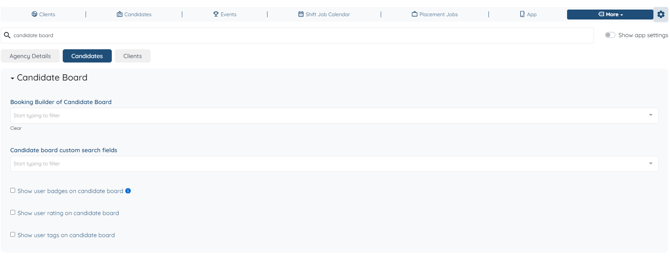
Both settings live in Global Settings but sit in different tabs. Rather than clicking through each one, use the search bar at the top of Global Settings and type "candidate board".
### Turn on the Candidate Board
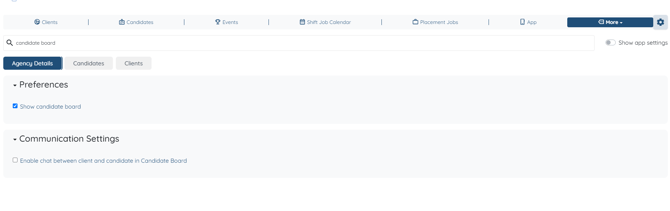
Go to **Global Settings \> Agency Details \> Preferences** and enable **Show Candidate Board**. Once it's on, the Candidate Board section appears in your client profiles.
### Choose which clients see the board
This part is optional. By default every client sees the board once it's turned on, so if that's what you want, you can stop here.
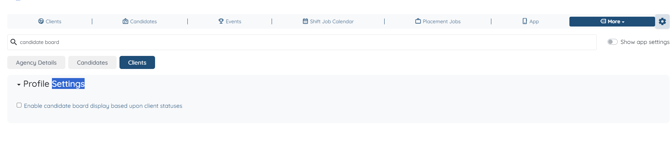
If you'd rather show it only to certain clients, for example only those who have finished onboarding or are actively booking, you can limit it by client status. Go to **Global Settings \> Clients \> Profile Settings** and check **Enable candidate board display based upon client statuses**. A field appears beneath it labelled **In Client Profile, Show candidate board Section to only those clients having statuses**. Select every status that should see the board.
Leaving that field blank shows the board to all clients, which is the same result as not enabling the setting at all. Use **Clear** to reset the selection.
To change what information appears on the board itself, see [Adjust what is displayed on the candidate board](https://learn.enginehire.io/en/knowledge/adjust-what-is-displayed-on-candidate-board?hsLang=en).
[If this content doesn't answer your questions you can always contact us by clicking here.](https://share.hsforms.com/1yIx2IRKyQQaVcMJW8kLbJg39wil)
- [Onboarding](https://learn.enginehire.io/en/knowledge/onboarding?hsLang=en)
- [Application Forms & Profiles](https://learn.enginehire.io/en/knowledge/application-forms-profiles?hsLang=en)
- [Templates & Communication](https://learn.enginehire.io/en/knowledge/templates-communication?hsLang=en#main-content)
- [Documents](https://learn.enginehire.io/en/knowledge/templates-communication?hsLang=en#documents)
- [Jobs](https://learn.enginehire.io/en/knowledge/jobs?hsLang=en)
- [Payments](https://learn.enginehire.io/en/knowledge/payments?hsLang=en)
- [Integrations](https://learn.enginehire.io/en/knowledge/integrations?hsLang=en)
- [App](https://learn.enginehire.io/en/knowledge/app?hsLang=en)
- [For Candidates & Clients](https://learn.enginehire.io/en/knowledge/for-candidates-clients?hsLang=en)
- [Backup Care](https://learn.enginehire.io/en/knowledge/backup-care?hsLang=en#main-content)
- [Instant Book](https://learn.enginehire.io/en/knowledge/backup-care?hsLang=en#instant-book)
- [Data Import & Export](https://learn.enginehire.io/en/knowledge/data-import-export?hsLang=en)
- [Reporting & Logs](https://learn.enginehire.io/en/knowledge/reporting-logs?hsLang=en)
- [Error](https://learn.enginehire.io/en/knowledge/error?hsLang=en#main-content)
- [Authentication](https://learn.enginehire.io/en/knowledge/error?hsLang=en#authentication)
- [Settings](https://learn.enginehire.io/en/knowledge/settings?hsLang=en)
- [Domain](https://learn.enginehire.io/en/knowledge/domain?hsLang=en)
- [Webinars and Training](https://learn.enginehire.io/en/knowledge/webinars-and-training?hsLang=en)
- [Ways to Grow and Make More Money](https://learn.enginehire.io/en/knowledge/ways-to-grow-and-make-more-money?hsLang=en)
- [Placements](https://learn.enginehire.io/en/knowledge/placements?hsLang=en#main-content)
- [Job Board](https://learn.enginehire.io/en/knowledge/placements?hsLang=en#job-board)
- [Enginehire Team Internal Videos](https://learn.enginehire.io/en/knowledge/enginehire-team-internal-videos?hsLang=en#main-content)
- [Settings](https://learn.enginehire.io/en/knowledge/enginehire-team-internal-videos?hsLang=en#settings)
- [AI](https://learn.enginehire.io/en/knowledge/ai?hsLang=en)
- Home
- Products
- Pricing
- Blog
- Company
[](https://enginehire.io)
Enginehire Help Center
Copyright © 2026, Enginehire Inc.
```json
{
"@context" : "https://schema.org",
"@type" : "VideoObject",
"contentUrl" : "https://5500893.fs1.hubspotusercontent-na1.net/hubfs/5500893/Finding%20Nemo%20-%2022%20April%202024.mp4",
"dateModified" : "2024-04-23T03:21:37.635Z",
"duration" : "PT1M21S",
"height" : 1080,
"name" : "Finding Nemo - 22 April 2024",
"thumbnailUrl" : "https://5500893.fs1.hubspotusercontent-na1.net/hubfs/5500893/Finding%20Nemo%20-%2022%20April%202024.mp4/medium.jpg",
"uploadDate" : "2024-04-23T03:21:37.630Z",
"width" : 1920
}
```