![enginehire logo thin dark 1.0.png]](https://learn.enginehire.io/hs-fs/hubfs/enginehire%20logo%20thin%20dark%201.0.png?height=40&name=enginehire%20logo%20thin%20dark%201.0.png)
Let’s get started 🚀
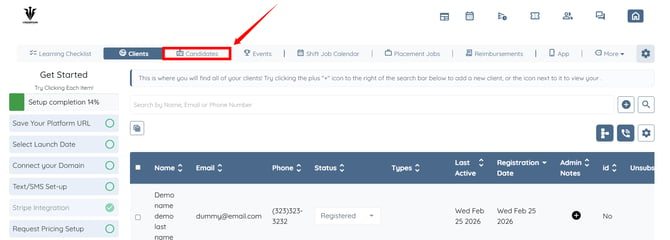
Step 1: Log in to your agent dashboard, then click Candidates from the navigation bar.
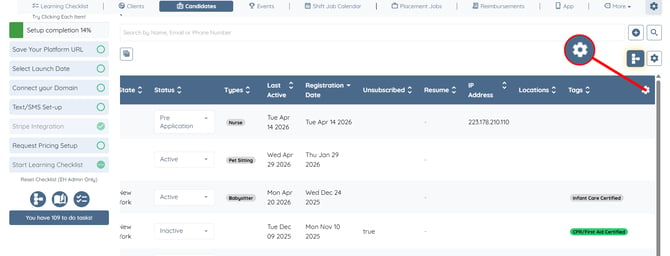
Step 2: Click the Gear icon on the right-hand side of the candidate table header to open the candidate dashboard settings.
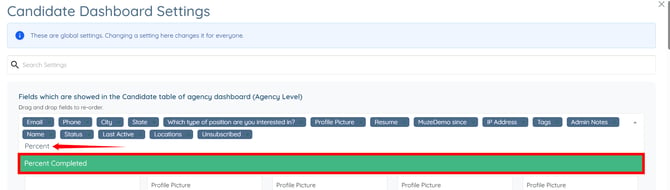
Step 3: Click the box as shown in the screenshot below.
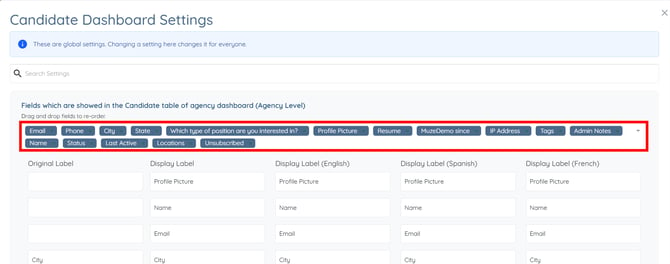
Step 4: Search for “Percent Completed” in the box, then select it from the dropdown list. The settings will be saved automatically.
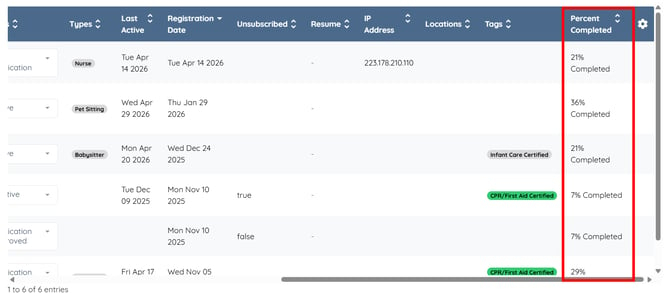
The Percent Completed column will be added to the candidate table, displaying the profile completion progress for each candidate.