![enginehire logo thin dark 1.0.png]](https://learn.enginehire.io/hs-fs/hubfs/enginehire%20logo%20thin%20dark%201.0.png?height=40&name=enginehire%20logo%20thin%20dark%201.0.png)
When you share a candidate with a client, the Show Client Profile to Candidate checkbox decides whether the candidate can see that client's profile. You can leave it unchecked while a match is still being considered, and Enginehire turns it on for you as soon as the match moves to Interested. The candidate can then view the client's profile without anyone going back to change the setting.
Before you start
The Show Client Profile to Candidate checkbox is available when sharing client profiles with candidates is turned on for your agency. If you don't see it when you share a candidate with a client, follow Adjust the setting to share a client profile when matching them with a candidate first.
How the Interested status affects client profile visibility
Early in a match, for example while it's Under Consideration, you may want to keep the client's details private by leaving Show Client Profile to Candidate unchecked. Other status changes leave that choice as it is.
When the match's relationship status changes to Interested, Enginehire checks Show Client Profile to Candidate automatically, even if it was unchecked before. This happens whether an admin sets the status to Interested or the client marks the candidate as interested, which sets the status to Interested on its own. Once that happens, the candidate can see the client in their portal.
How to mark a match as Interested
You change a match's status from the client's profile.
- Click Clients and open the client's profile.
- Under the Admin tab, click Matches.
- On the candidate's card, click Update Status.
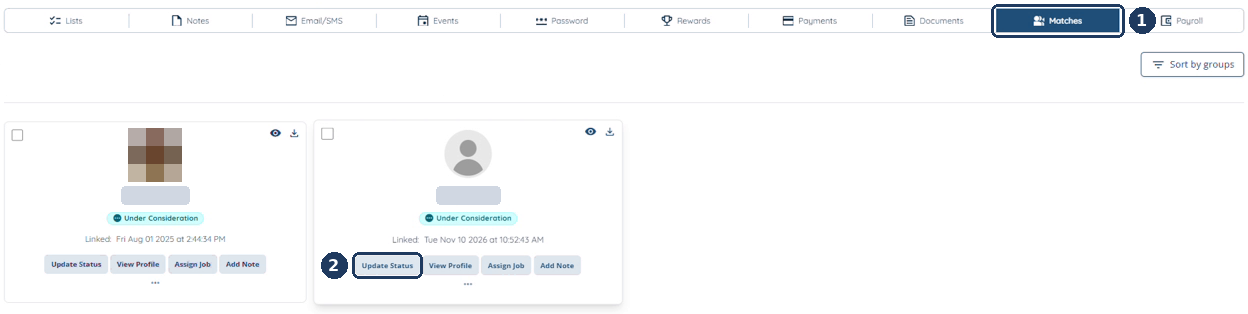
- In the status dropdown on the right, select Interested. Choose Interested itself, not Candidate Interested, which is a separate status.

- Click Update.
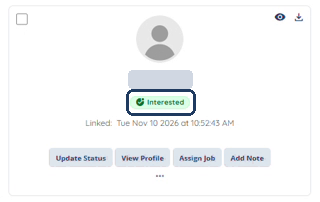
You'll see the message Candidate to Client link updated! and the candidate's card now shows Interested. If you click Update Status on that card again, Show Client Profile to Candidate is now checked.
Where the candidate sees the client profile
After the match moves to Interested, the client appears on the candidate's Client Profiles tab when they log in. Each client card has a View Client Profile button, which opens the client's profile, and a Message button.

Related articles
Share Candidate Profiles with Clients
Adjust the setting to share a client profile when matching them with a candidate