![enginehire logo thin dark 1.0.png]](https://learn.enginehire.io/hs-fs/hubfs/enginehire%20logo%20thin%20dark%201.0.png?height=40&name=enginehire%20logo%20thin%20dark%201.0.png)
Candidates see their upcoming shifts on the schedule calendar in their Enginehire dashboard, and each shift shows the client's first name only. If your candidates need to tell clients apart at a glance without opening every shift, you can show each client's full name, first and last, on that calendar instead.
What candidates see on their schedule calendar
With Show client full name (first and last name) on candidate schedule calendar turned on, each shift on a candidate's calendar shows the client's first and last name, followed by the shift time and status. With it off, the same shift shows only the client's first name.
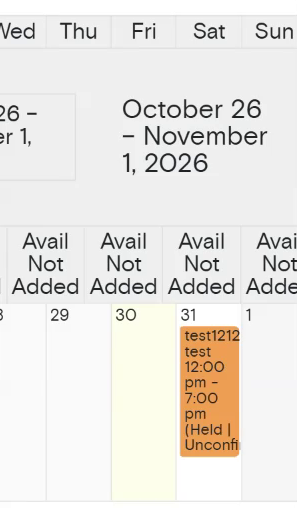
The setting applies to every candidate on your account. It changes the calendar candidates see under My Schedule when they sign in to Enginehire on the web, including from a phone's browser. Because candidates will see clients' last names, turn it on only if your agency is comfortable sharing them with the candidates assigned to those shifts.
How to show clients' full names on the candidate schedule calendar
- From your agent dashboard, go to More > Global Settings.
- Open the Candidates tab and expand Schedule, Availability Settings.
- Check Show client full name (first and last name) on candidate schedule calendar.

The setting saves as soon as you check it, and a Setting saved message confirms the change. Candidates who already have their calendar open see full names once the page reloads. To find the setting quickly, type part of its name into the search bar at the top of Global Settings.
To go back to first names only, uncheck the same setting.
Client names on your own Shift Job Calendar
This setting only changes what candidates see. The client name on the Shift Job Calendar in your agent dashboard is set separately, as explained in Select Client Name Field for Shift Job Calendar.
Related articles
Select Client Name Field for Shift Job Calendar
For Candidates Enter in Schedule Availability