![enginehire logo thin dark 1.0.png]](https://learn.enginehire.io/hs-fs/hubfs/enginehire%20logo%20thin%20dark%201.0.png?height=40&name=enginehire%20logo%20thin%20dark%201.0.png)
Let’s get started 🚀
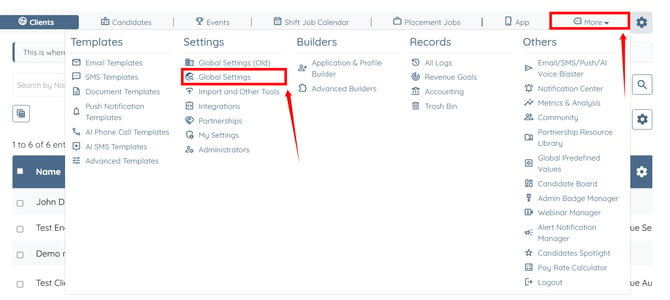
Step 1: Log in to your agent dashboard and click More > Global Settings, as shown in the screenshot below.
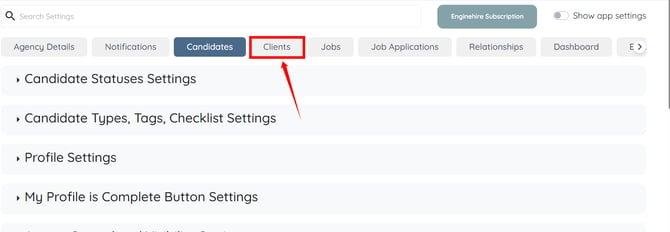
Step 2: Click the Clients tab from the available tabs.
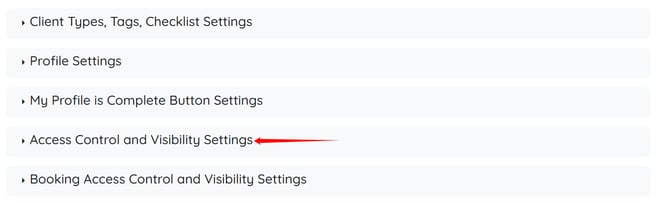
Step 3: Click the Access Control and Visibility Settings option to expand and view its details.
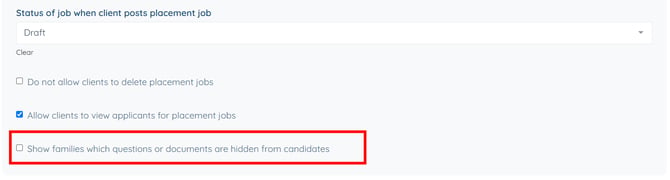
Step 4: Enable the Show families which questions or documents are hidden from candidates checkbox.
The settings will be saved automatically.
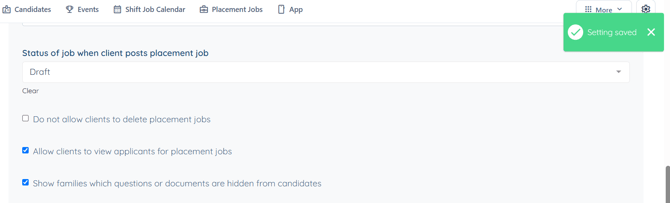
Clients will be able to view the questions or documents in their profile that are hidden from candidates.
Step 1: Log in to your agent dashboard and click More > Global Settings, as shown in the screenshot below.
Step 2: Click the Clients tab from the available tabs.
Step 3: Click the Access Control and Visibility Settings option to expand and view its details.
Step 4: Enable the Show families which questions or documents are hidden from candidates checkbox.
The settings will be saved automatically.
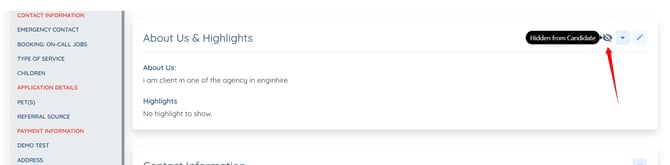
Clients will be able to view the questions or documents in their profile that are hidden from candidates.
To learn more on how to hide sections and fields in the candidate or client profiles, you can refer to the Hide Profile Fields and Sections article.