![enginehire logo thin dark 1.0.png]](https://learn.enginehire.io/hs-fs/hubfs/enginehire%20logo%20thin%20dark%201.0.png?height=40&name=enginehire%20logo%20thin%20dark%201.0.png)
Let’s get started 🚀
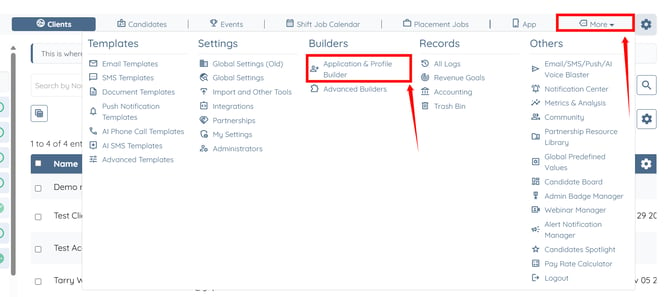
Step 1: Log in to your agent dashboard and click More > Application & Profile Builder, as shown in the screenshot below.
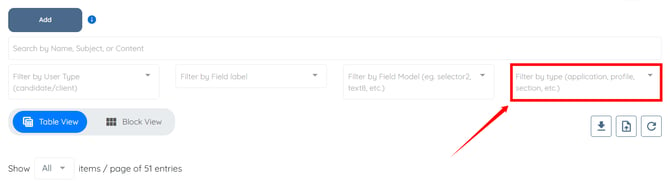
Step 2: Click the Filter by type box to open the dropdown list.
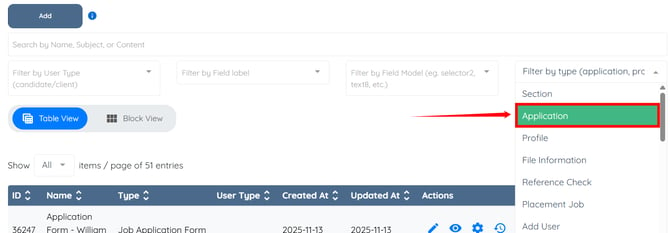
Step 3: Select the Application option from the dropdown list.
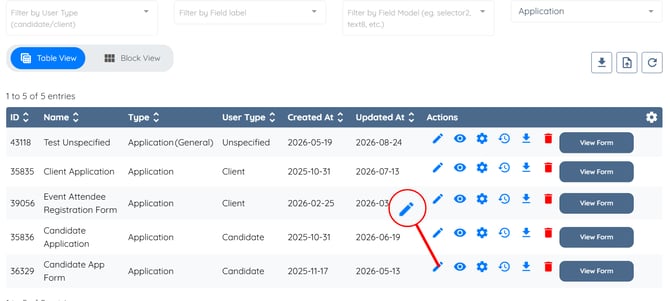
Step 4: Click the pencil icon under the Actions column next to the application builder from which you want to remove a section.
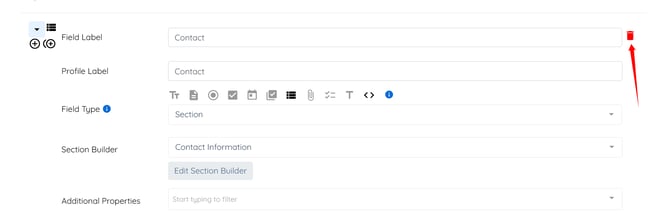
Step 5: Click the trash icon to remove the section from the application builder.
Step 6: Click the Save button to confirm your changes.
Step 1: Log in to your agent dashboard and click More > Application & Profile Builder, as shown in the screenshot below.
Step 2: Click the Filter by type box to open the dropdown list.
Step 3: Select the Application option from the dropdown list.
Step 4: Click the pencil icon under the Actions column next to the application builder from which you want to remove a section.
Step 5: Click the trash icon to remove the section from the application builder.
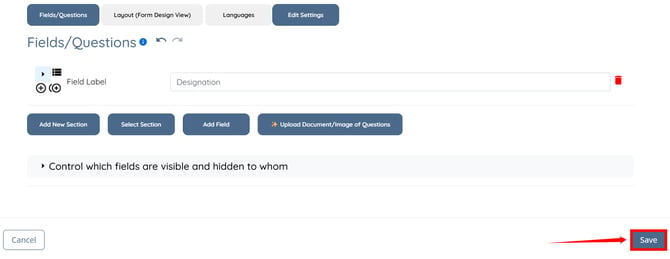
Step 6: Click the Save button to confirm your changes.