![enginehire logo thin dark 1.0.png]](https://learn.enginehire.io/hs-fs/hubfs/enginehire%20logo%20thin%20dark%201.0.png?height=40&name=enginehire%20logo%20thin%20dark%201.0.png)
Let's get Started🚀
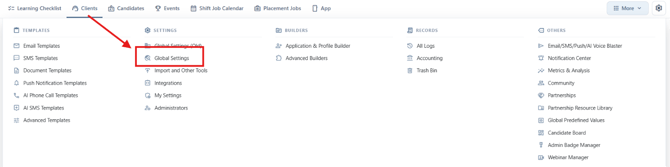
Step 1. Log in to Agency and Navigate to More.

Step 2. Navigate to Global Setting.
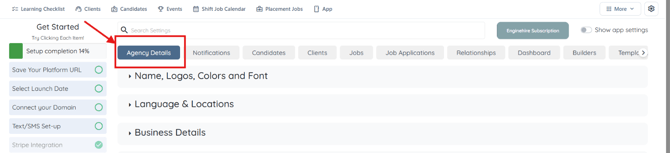
Step 3. Click on Agency Details.
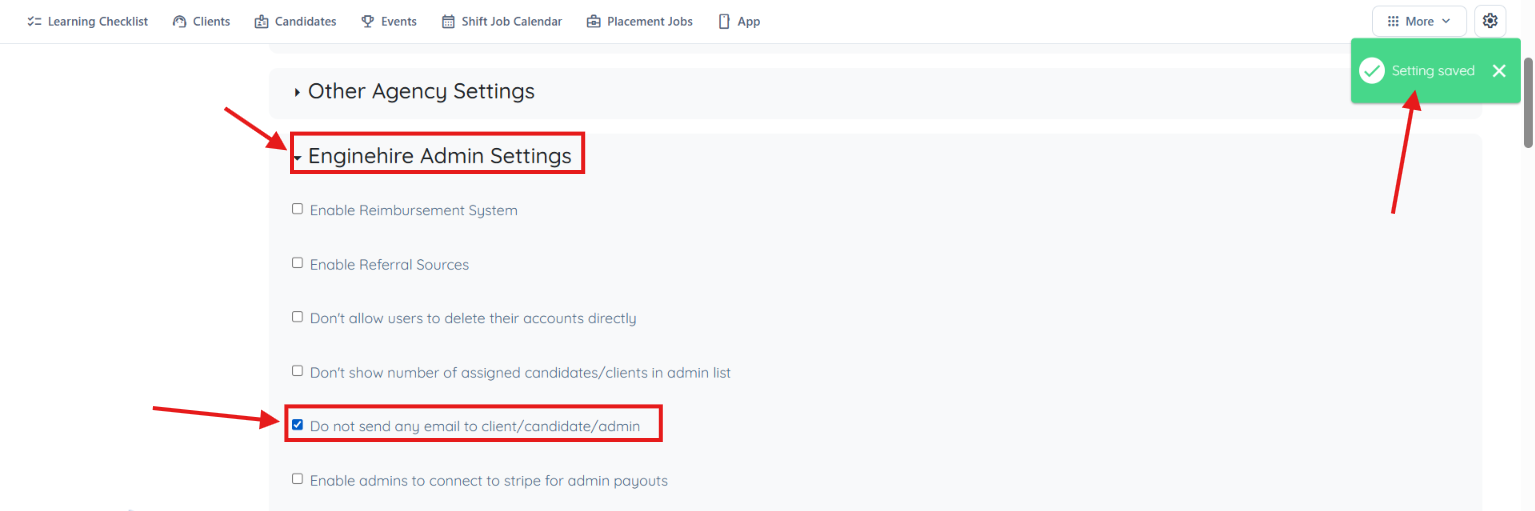
Step 4. Expand Enginehire Admin Settings and enable "Do not send any email to client/candidate/admin" checkbox.
Step 1. Log in to Agency and Navigate to More.
Step 2. Navigate to Global Setting.
Step 3. Click on Agency Details.
Step 4. Expand Enginehire Admin Settings and enable "Do not send any email to client/candidate/admin" checkbox.
Once enabled and saved, the setting remains active, helping prevent unwanted emails from being sent.