![enginehire logo thin dark 1.0.png]](https://learn.enginehire.io/hs-fs/hubfs/enginehire%20logo%20thin%20dark%201.0.png?height=40&name=enginehire%20logo%20thin%20dark%201.0.png)
Prerequisites
Before you begin, make sure you have:
- A paid Indeed account.
- An active subscription to the Premium Integration.
The Indeed integration costs $25 per active job post per month. The fee applies to each job that remains active on the external job boards during that month.
For example, if you have three active jobs in August and remove one before September begins, you will be charged for two active jobs in September.
Let’s get started 🚀
Connect Enginehire with Indeed
Follow these steps to authorize the integration and connect your Indeed account with Enginehire.
Step 1: Log in to your agent dashboard and click More > Integrations, as shown in the screenshot below.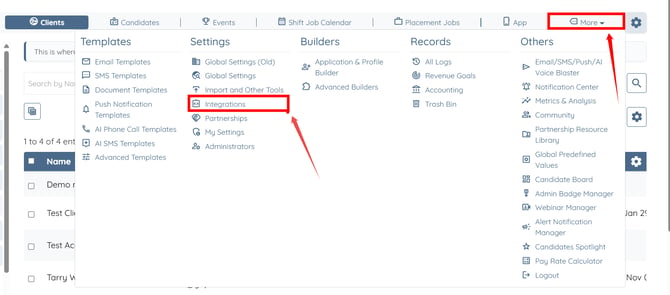
Step 2: Click the External Job Board Integration (Indeed, etc.) option to expand its details.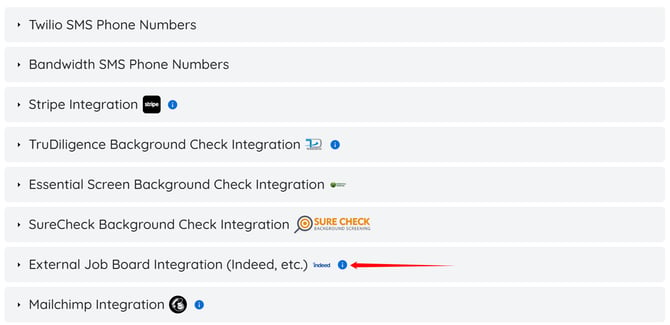
Step 3: Click the Authorize button.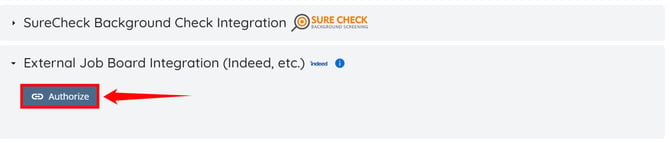
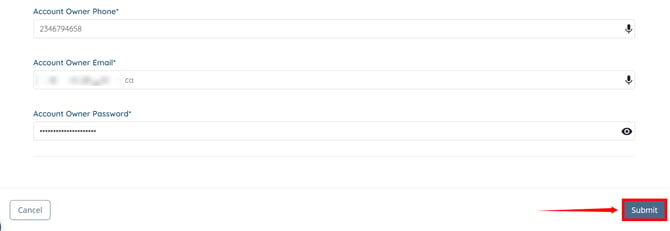
Step 4: Fill out the form to create a new account for the integration, then click Submit.
Remember the email address and password you use to create this account. You will need these credentials in the upcoming setup steps.
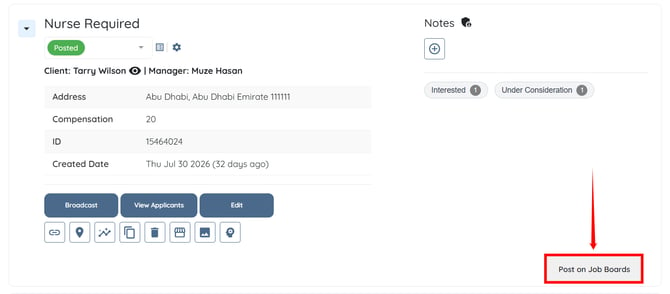
Step 5: To post your first job to the job boards, go to the Placement section on your Enginehire dashboard. Click Post on Job Boards for any job you have created.
Review the job information, make sure everything is complete and accurate, then click Submit.
You must post at least one job to the job boards before you can connect your Indeed account.
Configure the Indeed Integration
The following steps are only needed for the set up process.
Step 6: Visit the https://login.enginehirerecruit.com/users/login link and log in using the credentials you created in step 4.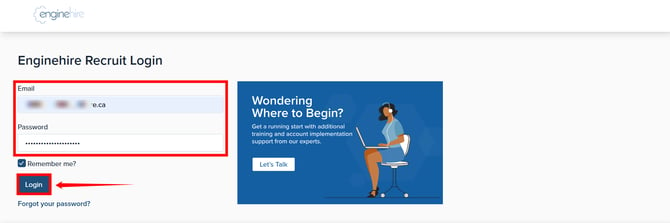
Step 7: After logging in, click the Menu icon in the top-right corner of the interface. 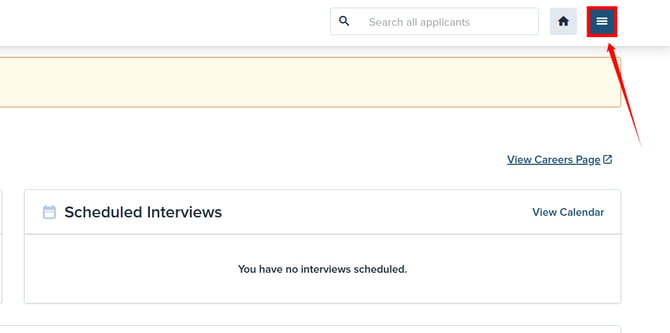
Step 8: Click the Account option.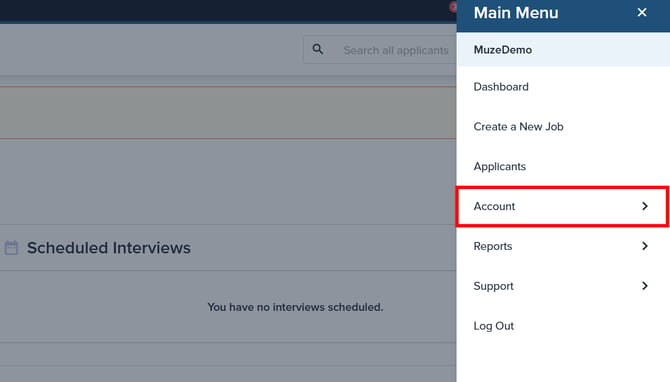
Step 9: Click the Account Details option.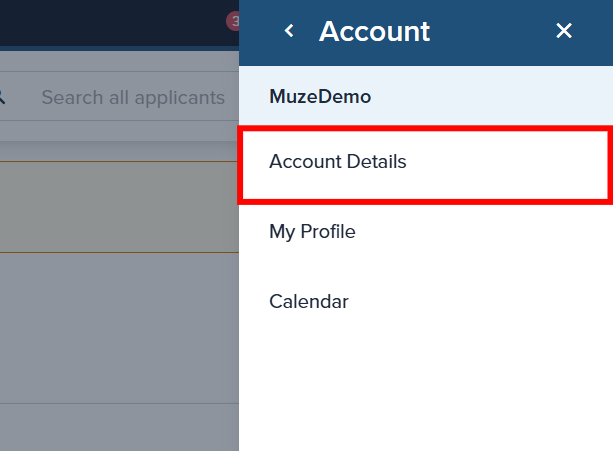
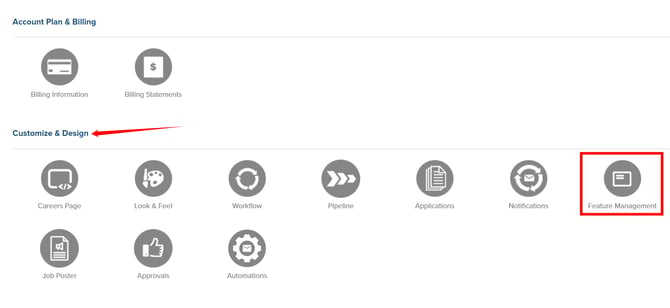
Step 10: Under Customize & Design, click Feature Management.
Step 11: Toggle Free Job Boards to OFF. The settings will be saved automatically. 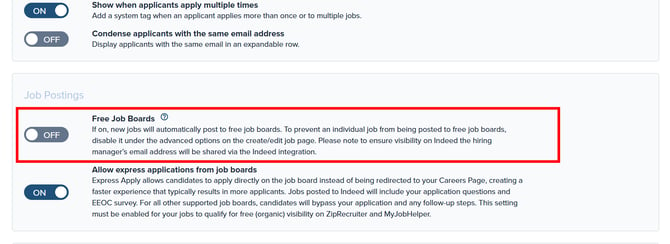
Step 12: Return to Account Details and click Indeed Sponsored under Integrate.
Enter your Indeed account credentials to connect your Indeed account.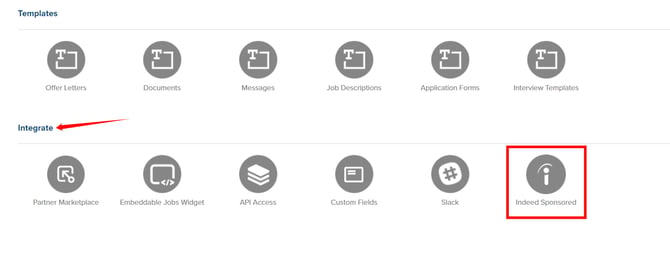
Post and Manage Jobs on Indeed
After completing the setup, you can post your Enginehire jobs to Indeed directly from the Placement section.
Go to the Placement section on your Enginehire dashboard and click Post on Job Boards for the job you want to publish.
To check whether a job is already posted, click Post on Job Boards. If you see options to Delete or Update the job, it indicates that the job is currently live on the job boards.
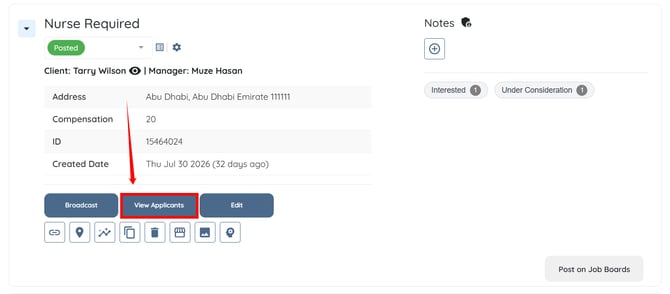
When you click View Applicants, you can see the applicants and their sources. Applicants who apply through Indeed are also added to your Candidates list in Enginehire.
Frequently Asked Questions
1. What candidate data is sent from Enginehire to Indeed?
The job information configured in the Enginehire job posting is sent to Indeed when the job is posted. The integration uses the information included in the job board posting.
2. What information is brought into Enginehire when someone applies through Indeed?
When a candidate applies through Indeed, Enginehire pulls available information from their Indeed application, generally including their name and email address along with other available information.
The candidate is then added to Enginehire, where you can manage their status and continue with the appropriate recruiting workflow.
3. Which free job boards are my jobs sent out to?
These job boards may conduct their own screening process on job postings and include only postings that comply with their terms of service or may decide not to post jobs for various reasons.
We offer syndication to the network of free job boards listed below. Share your jobs on these boards quickly by simply toggling on the option for the Free Job Boards on your job listing under + Show Advanced Options located on the create/edit job page.
- Adzuna
- CareerJet
- FlexJobs
- Jobcase
- Jobinventory.com
- Jobrapido
- Jooble
- Juju
- LinkUp
- MyJobHelper**
- PostJobFree
- Trovit
- Twine.net
- WayUp
- ZipRecruiter*
- Indeed*
- Monster Controlled Listings
*IMPORTANT: Some job boards have additional steps to be included. Please see the following Support Articles for more details:
- ZipRecruiter and MyJobHelper require that you allow express applications from job boards. More on that here: Applications: Express Applications
- Indeed - Getting Started & Best Practices
**Many job boards automatically distribute jobs to other job boards based on the job types. For example, MyJobHelper distributes relevant jobs to the following boards automatically:
- MyJobhelper.com
- CareerDiversity.com
- HiredCDL.com
- VeteransinCDL.com
- WomeninCDL.com
- HiredNurses.com
- HiredCustomerService.com
- HiredAllied.com
- HiringRetail.com
- HiringRestaurant.com
- HiringLogistics.com
- HiringManufacturing.com
- SalesHiring.com
- HiringTechnology.com
- HiredatHome.com
4. What paid job boards are available?
Sometimes you want to get the word out about a new job posting fast and furiously and you're willing to spend a few bucks to shorten your time to hire. We offer a wide variety of paid job boards you can post your active jobs to (in addition to our free job board network), all right from within your account.
Don't see the job board you're looking for? Just select the "Other Job Boards" option from the shopping cart. This will create a ticket for our Support Team. We will take a look at the requested board and then contact you to go over that board's posting options.
Paid Job Boards Options
- Adzuna
- AllRetailJobs.com
- AutoJobs.com
- CareerBuilder
- Careerjet
- Coroflot
- Craigslist
- Culinary Agents
- Dice
- DiversityJobs
- Fleetjobs.com
- Hcareers
- Idealist
- Indeed*
- JobServe
- JobsInLogistics.com
- JobsinManufacturing.com
- JobsinTrucks.com
- Jobing
- JustChurchJobs
- KSL Jobs (ONLY for jobs in Wyoming, Idaho, and Utah)
- Landed
- LinkedIn Daily
- Mac's List
- Monster
- Nexxt (formerly Beyond)
- PDX Pipeline
- Poached Jobs
- PureJobs
- Resume Library
- SchoolSpring
- Snagajob
- Totallyhired
- TopUSAJobs.com
- Totallyhired.com
- TechCrunch
- ZipRecruiter Boost
- ZipRecruiter Daily
- ZipRecruiter Premium
For quick and easy instructions on how to post a job to paid job boards, click here.
*Indeed listings also include Indeed's Trusted Media Network, a multi-channel advertising feature available as part of Indeed's advertising experience. The Trusted Media Network allows for improved targeting of job seekers, beyond Indeed, helping you automatically reach more of the candidates you want on over 120+ industry-specific and generalist job sites, expanding your reach, all from one place.