![enginehire logo thin dark 1.0.png]](https://learn.enginehire.io/hs-fs/hubfs/enginehire%20logo%20thin%20dark%201.0.png?height=40&name=enginehire%20logo%20thin%20dark%201.0.png)
How to Enable Pagination
You can customize this setting for different parts of your workflow in just a few clicks. Follow these steps:
-
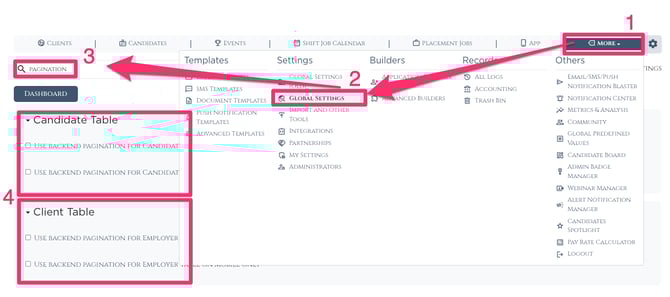
Navigate to More: Click on the More tab in your main navigation menu.
-
Open Global Settings: Select Global Settings from the dropdown options.
-
Find Search Pagination: Locate the Search Pagination section within the settings menu.
-
Select Your Preference: You will see options to enable pagination for:
-
Clients
-
Candidates
-
Both
-
-
Save Changes: Check the boxes for the categories you wish to update. The changes will take effect immediately.
Why Enable Pagination?
Turning on this setting is a "quick win" for your workflow for several reasons:
-
Increased Speed: By loading less data at once, the page becomes significantly more responsive and reduces "lag."
-
Reduced Browser Strain: It prevents your web browser from freezing up when dealing with thousands of records.
-
Easy Reversibility: This is a low-risk setting. If you find that you prefer the continuous scrolling method, you can toggle it off instantly without affecting your data.