---
title: How to disable the client/candidate profile header for admin
description: This article will show you how to control the appearance of the client/candidate profile header for admin. Sometimes for admins to avoid a page scroll you can disable the profile top headers and can view profile sections directly.
---
[Skip to content](https://learn.enginehire.io/en/knowledge/how-to-disable-the-profile-header-for-admin#main-content)
English
Show submenu for translations
[Contact us](https://learn.enginehire.io/en/knowledge/kb-tickets/new?hsLang=en) [Customer portal](https://learn.enginehire.io/tickets-view?hsLang=en)
![enginehire logo thin dark 1.0.png\]](https://learn.enginehire.io/hs-fs/hubfs/enginehire%20logo%20thin%20dark%201.0.png?height=40&name=enginehire%20logo%20thin%20dark%201.0.png)
- Home
- Products
- Pricing
- Blog
- Company
Open main navigation
Close main navigation
- Home
- Products
- Pricing
- Blog
- Company
- English
Show submenu for translations
- [Contact us](https://learn.enginehire.io/en/knowledge/kb-tickets/new)
- [Customer portal](https://learn.enginehire.io/tickets-view)
- Go to main page
Go to main page
Hello! You can find guides on how to do everything in Enginehire here. If you can't find what you are looking for or anything feels out of date, please contact us!
- There are no suggestions because the search field is empty.
1. [Enginehire Help Center](https://learn.enginehire.io/en/knowledge?hsLang=en)
2. [Application Forms & Profiles](https://learn.enginehire.io/en/knowledge/application-forms-profiles?hsLang=en)
# How to disable the client/candidate profile header for admin
## This article will show you how to control the appearance of the client/candidate profile header for admin. Sometimes for admins to avoid a page scroll you can disable the profile top headers and can view profile sections directly.
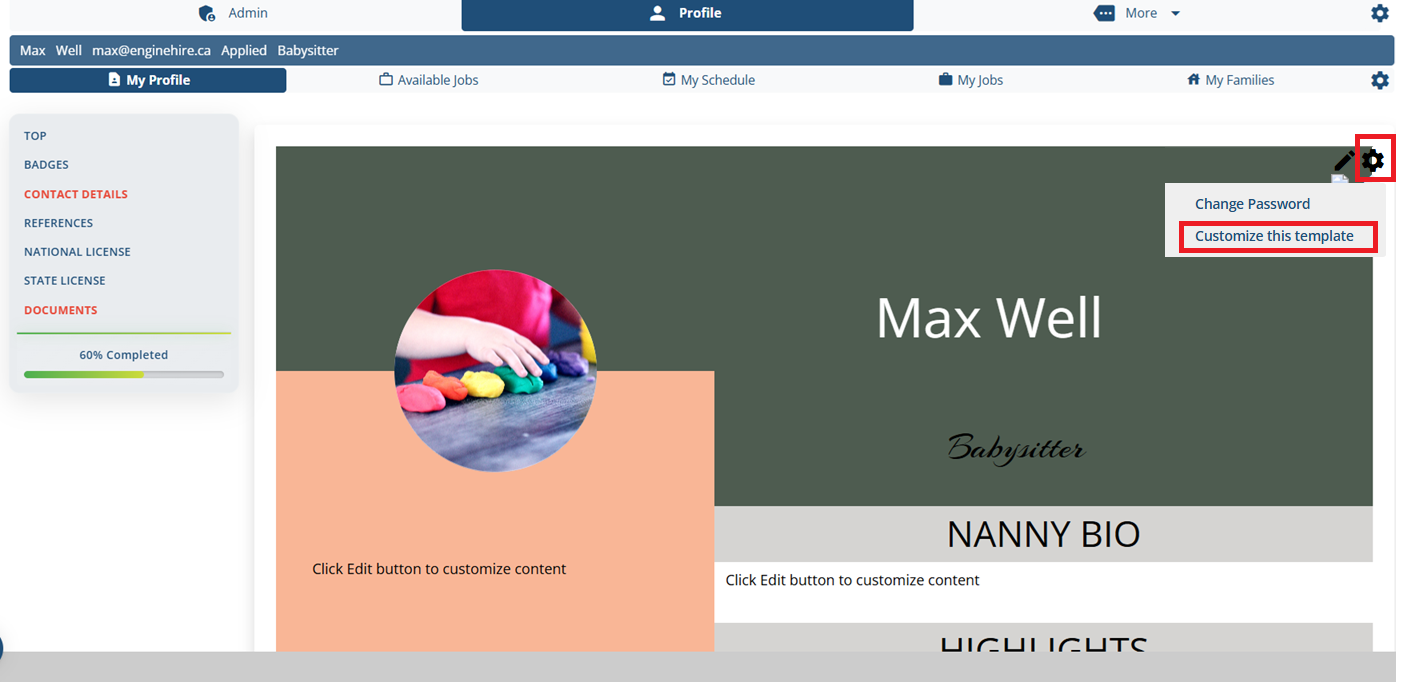
This is how the profile header looks like, lets see how to disable it with easy steps.
1\. Go the candidate Profile
2\. On header click on setting / gear icon and select "Customize this template"
****
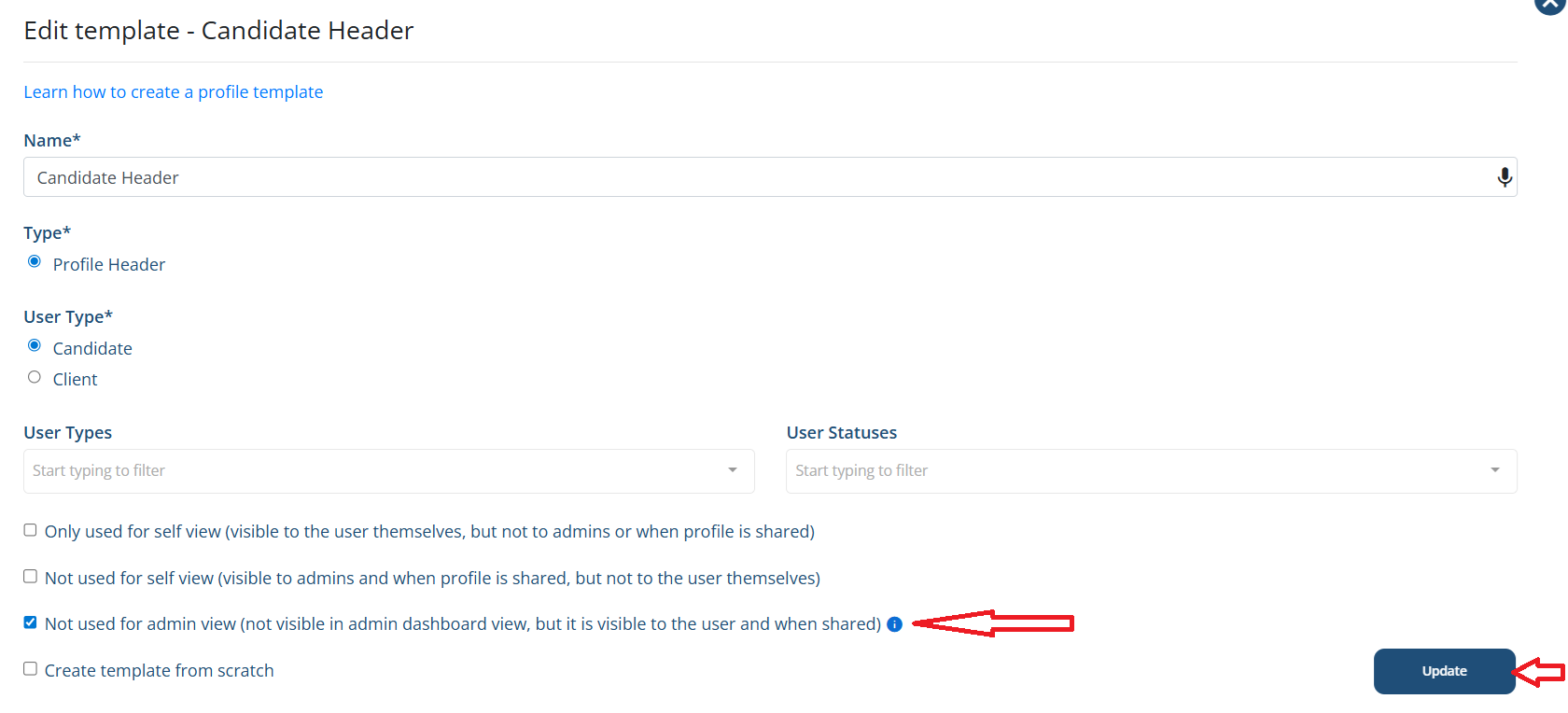
3\. Look for the setting "Not used for admin view" and check the setting checkbox. Update the setting.
****
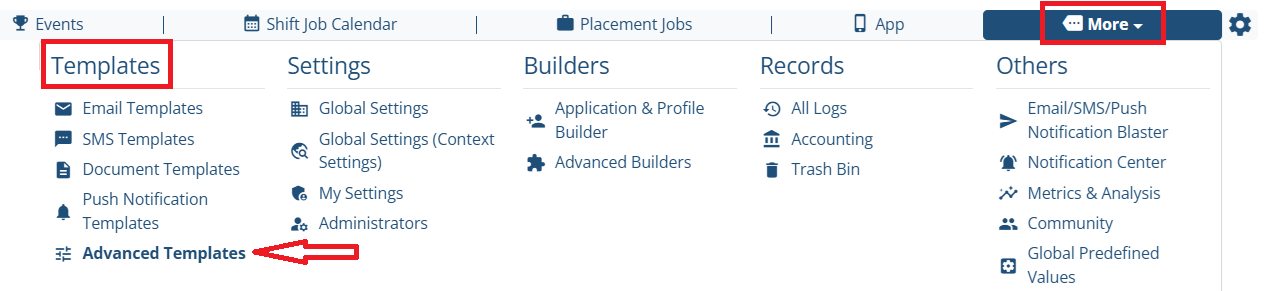
Here is another detailed method to find the profile headers,
**Step 1:**
Go to MORE-\> Templates -\> Advanced Templates
**Step 2:**
Click on Profile Templates
****
**Step 3:**
You will see all the headers for the client / candidate. Look for the header you want to disable and click on pencil / edit icon.
****
**Step 4:**
Look for the setting "Not used for admin view" and check the setting checkbox. Update the setting.
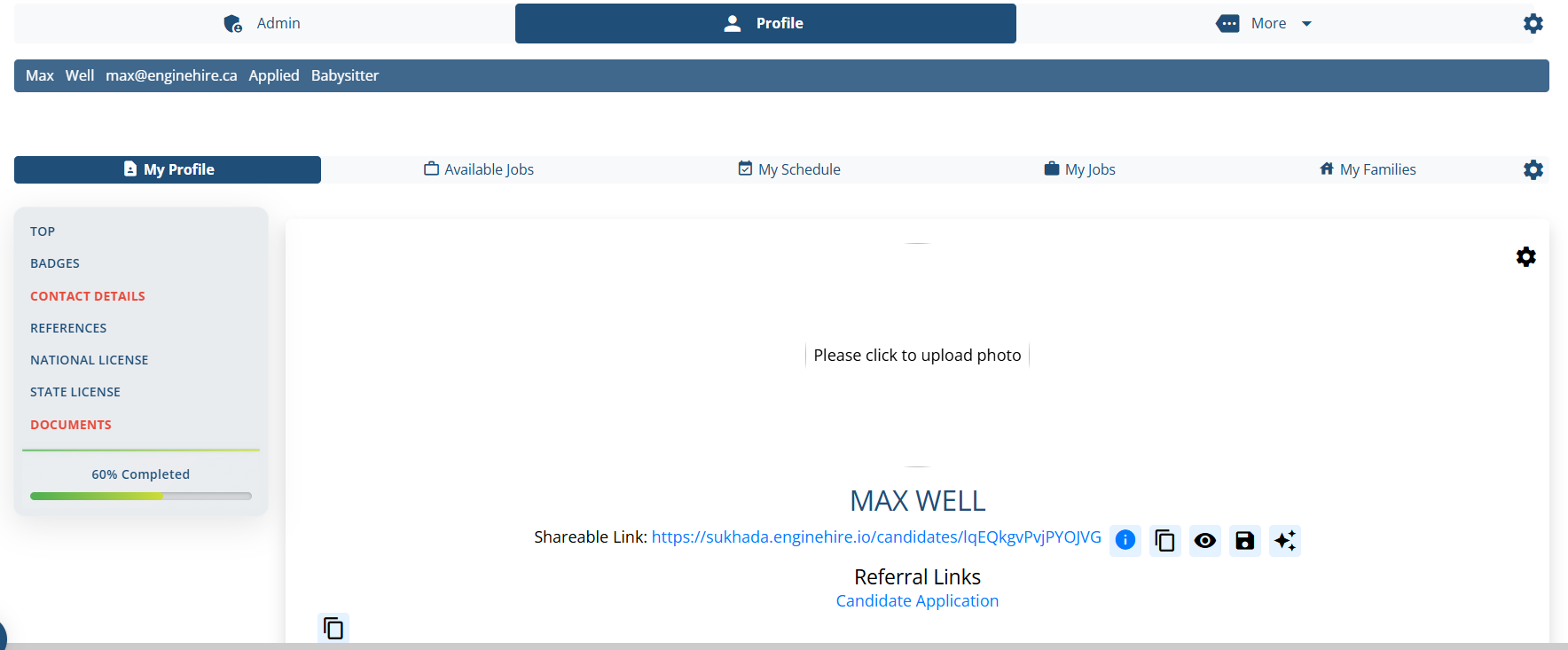
**Result:**
The header is not appear on the profile.
****
The following video is from a previous interface but the information is still accurate.
[If this video doesn't answer your questions you can always contact us by clicking here](https://share.hsforms.com/1yIx2IRKyQQaVcMJW8kLbJg39wil)
- [Onboarding](https://learn.enginehire.io/en/knowledge/onboarding?hsLang=en)
- [Application Forms & Profiles](https://learn.enginehire.io/en/knowledge/application-forms-profiles?hsLang=en)
- [Templates & Communication](https://learn.enginehire.io/en/knowledge/templates-communication?hsLang=en#main-content)
- [Documents](https://learn.enginehire.io/en/knowledge/templates-communication?hsLang=en#documents)
- [Jobs](https://learn.enginehire.io/en/knowledge/jobs?hsLang=en)
- [Payments](https://learn.enginehire.io/en/knowledge/payments?hsLang=en)
- [Integrations](https://learn.enginehire.io/en/knowledge/integrations?hsLang=en)
- [App](https://learn.enginehire.io/en/knowledge/app?hsLang=en)
- [For Candidates & Clients](https://learn.enginehire.io/en/knowledge/for-candidates-clients?hsLang=en)
- [Backup Care](https://learn.enginehire.io/en/knowledge/backup-care?hsLang=en#main-content)
- [Instant Book](https://learn.enginehire.io/en/knowledge/backup-care?hsLang=en#instant-book)
- [Data Import & Export](https://learn.enginehire.io/en/knowledge/data-import-export?hsLang=en)
- [Reporting & Logs](https://learn.enginehire.io/en/knowledge/reporting-logs?hsLang=en)
- [Error](https://learn.enginehire.io/en/knowledge/error?hsLang=en#main-content)
- [Authentication](https://learn.enginehire.io/en/knowledge/error?hsLang=en#authentication)
- [Settings](https://learn.enginehire.io/en/knowledge/settings?hsLang=en)
- [Domain](https://learn.enginehire.io/en/knowledge/domain?hsLang=en)
- [Webinars and Training](https://learn.enginehire.io/en/knowledge/webinars-and-training?hsLang=en)
- [Ways to Grow and Make More Money](https://learn.enginehire.io/en/knowledge/ways-to-grow-and-make-more-money?hsLang=en)
- [Placements](https://learn.enginehire.io/en/knowledge/placements?hsLang=en#main-content)
- [Job Board](https://learn.enginehire.io/en/knowledge/placements?hsLang=en#job-board)
- [Enginehire Team Internal Videos](https://learn.enginehire.io/en/knowledge/enginehire-team-internal-videos?hsLang=en#main-content)
- [Settings](https://learn.enginehire.io/en/knowledge/enginehire-team-internal-videos?hsLang=en#settings)
- [AI](https://learn.enginehire.io/en/knowledge/ai?hsLang=en)
- Home
- Products
- Pricing
- Blog
- Company
[](https://enginehire.io)
Enginehire Help Center
Copyright © 2026, Enginehire Inc.
```json
{
"@context" : "https://schema.org",
"@type" : "VideoObject",
"contentUrl" : "https://5500893.fs1.hubspotusercontent-na1.net/hubfs/5500893/Profile%20Headers.mp4",
"dateModified" : "2023-12-29T13:21:05.181Z",
"description" : "",
"duration" : "PT2M20.367S",
"height" : 720,
"name" : "Disable profile header for admin",
"thumbnailUrl" : "https://5500893.fs1.hubspotusercontent-na1.net/hubfs/5500893/Profile%20Headers.mp4/medium.jpg",
"uploadDate" : "2023-12-29T13:19:15.708Z",
"width" : 1146
}
```