![enginehire logo thin dark 1.0.png]](https://learn.enginehire.io/hs-fs/hubfs/enginehire%20logo%20thin%20dark%201.0.png?height=40&name=enginehire%20logo%20thin%20dark%201.0.png)
When a shift job has a job category, you can make sure its automatic broadcast only reaches candidates whose profile types include that category. For example, a job in a child care category is broadcast only to candidates who have that child care type on their profile, and candidates without it are not notified.
This keeps broadcasts relevant to each candidate and helps you avoid notifying people who are not set up for that kind of work.
Let's get started 🚀
How to broadcast only to candidates whose types include the job category
Step 1: Log in to your agent dashboard and click More > Global Settings.
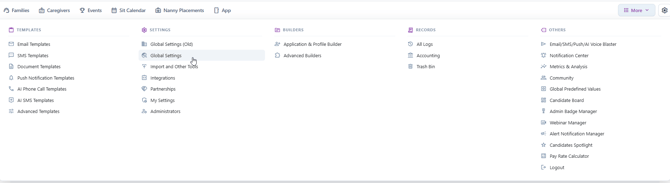
Step 2: Click the Jobs tab.

Step 3: Click Shift Job Auto Broadcast to expand the section.
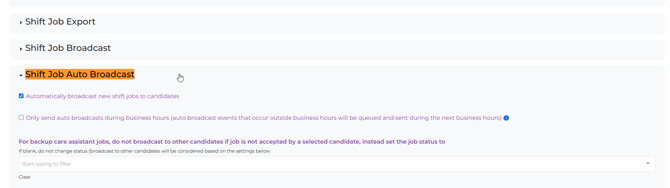
Step 4: Make sure Automatically broadcast new shift jobs to candidates is checked. This shows the rest of the auto broadcast options.
From now on, new shift jobs are automatically broadcast only to candidates whose types include the job's category. For the match to work, make sure your candidates have the right types on their profiles and your shift jobs have a category set.
Related articles
To see every auto broadcast option in one place, read Find Auto Broadcast Settings. To apply the same rule to what candidates can see on their available jobs, read Only allow candidates to see shift jobs if their types include the job category.
If this article doesn't answer your questions, you can always contact us by clicking here.