![enginehire logo thin dark 1.0.png]](https://learn.enginehire.io/hs-fs/hubfs/enginehire%20logo%20thin%20dark%201.0.png?height=40&name=enginehire%20logo%20thin%20dark%201.0.png)
Auto Broadcast settings control how and when broadcasts are sent. Broadcasts are limited to eligible candidates, including those who have not exceeded configured weekly working hour limits.
For details on configuring weekly working hour limits, see Prevent Candidates from Exceeding Weekly Working Hours.
Let’s get started 🚀
Step 1: Log in to your agent dashboard, click More > Global Settings as shown in the screenshot below. 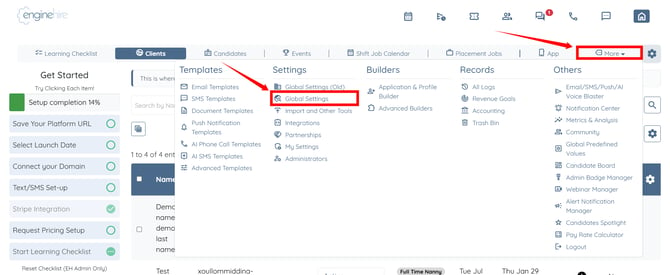
Step 2: Click the Jobs tab from the available tabs.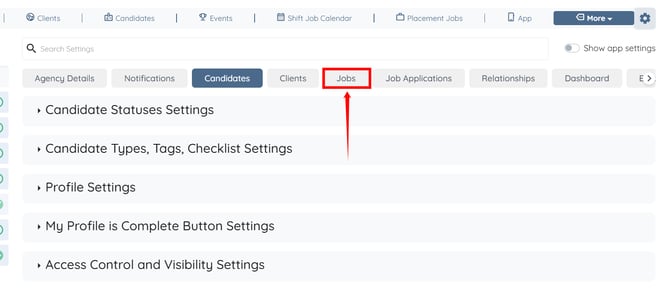
Step 3: Click the Shift Job Auto Broadcast option to expand and view its details.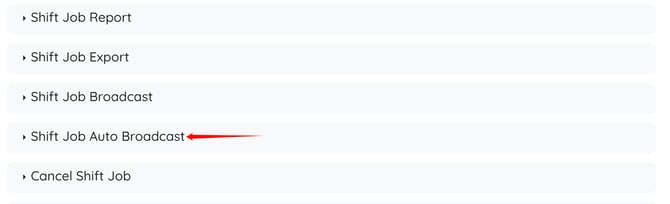
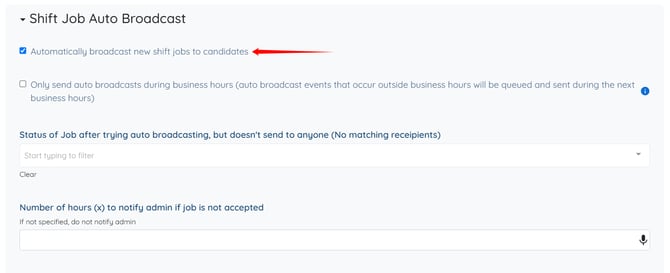
Here, you can view all the Auto Broadcast settings and control how the system sends shift broadcasts to candidates.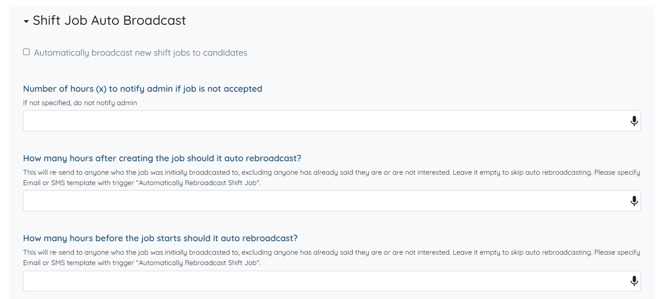
Step 4: You can also check the Automatically broadcast new shift jobs to candidates checkbox to view more options.