![enginehire logo thin dark 1.0.png]](https://learn.enginehire.io/hs-fs/hubfs/enginehire%20logo%20thin%20dark%201.0.png?height=40&name=enginehire%20logo%20thin%20dark%201.0.png)
Let’s get started 🚀
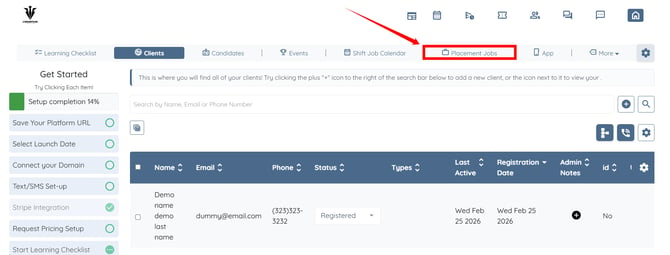
Step 1: Log in to your agent dashboard and click Placement Jobs in the navigation bar.
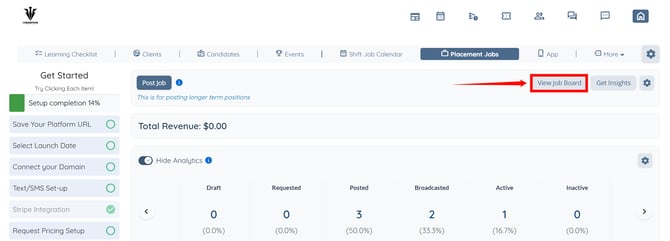
Step 2: Click the View job Board button to open the job board.
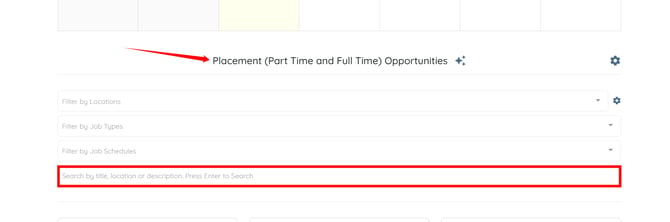
Step 3: Scroll to the Placement (Part Time and Full Time) Opportunities section. Then, use any of the available filter options to refine the list of jobs.
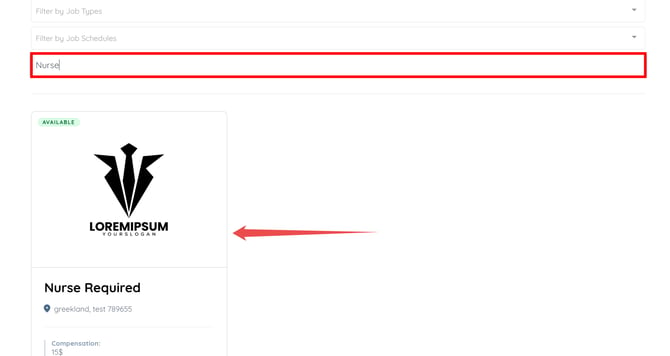
For demonstration purposes, we will filter the placement opportunities by searching for a job title.
The job list will be filtered to display only jobs that match the selected filter criteria.
Step 1: Log in to your agent dashboard and click Placement Jobs in the navigation bar.
Step 2: Click the View job Board button to open the job board.
Step 3: Scroll to the Placement (Part Time and Full Time) Opportunities section. Then, use any of the available filter options to refine the list of jobs.
For demonstration purposes, we will filter the placement opportunities by searching for a job title.
The job list will be filtered to display only jobs that match the selected filter criteria.