![enginehire logo thin dark 1.0.png]](https://learn.enginehire.io/hs-fs/hubfs/enginehire%20logo%20thin%20dark%201.0.png?height=40&name=enginehire%20logo%20thin%20dark%201.0.png)
Let’s get started 🚀
Step 1: Log in to your agent dashboard and click More > Global Settings (Old), as shown in the screenshot below. 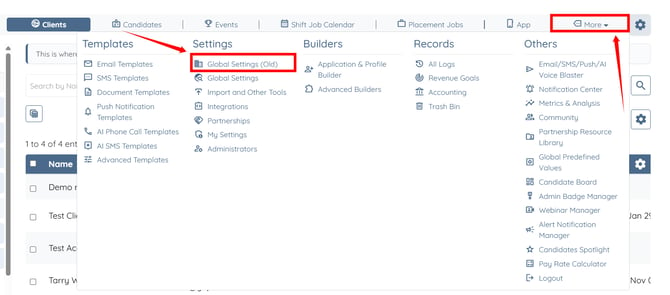
Step 2: Click the Jobs tab from the available tabs.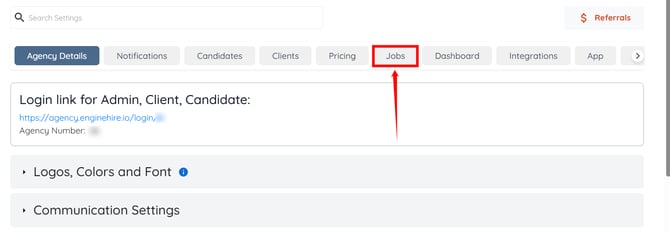
Step 3: Click the Job Board Settings to expand and view its details.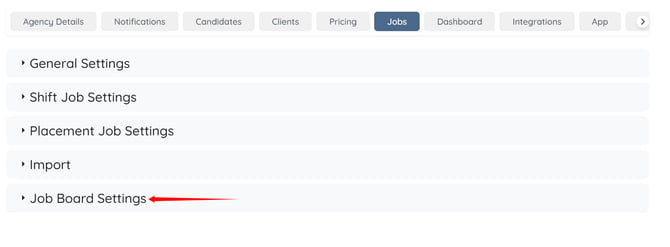
Step 4: Click the General Display of Jobs tab from the available tabs.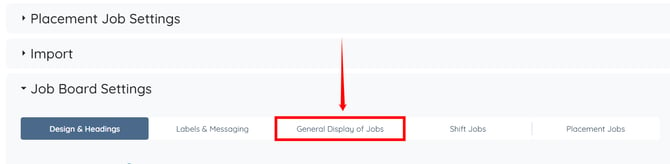
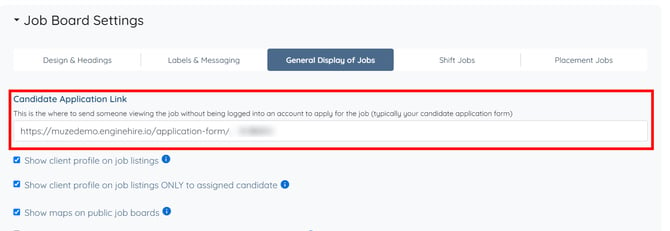
Step 5: Paste the candidate application form link in the box under the Candidate Application Link field.
To learn where and how to get the candidate application form link, refer to the How To Find the Client and Candidate Application Links article.
Step 6: Click the Save icon to confirm your changes.
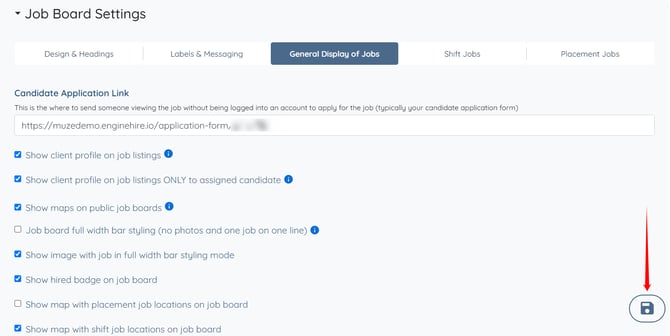
The Apply Now button will appear on placement jobs listed on the job board.