![enginehire logo thin dark 1.0.png]](https://learn.enginehire.io/hs-fs/hubfs/enginehire%20logo%20thin%20dark%201.0.png?height=40&name=enginehire%20logo%20thin%20dark%201.0.png)
Every candidate has a shareable link that opens their shareable profile, which clients can view without logging in. Instead of opening each candidate's profile to copy it, you can add a Shareable Link column to your candidate table and copy any candidate's link in one click. It's a quick way to send several candidates to a client when you're filling a placement.
How to add the Shareable Link column to the candidate table
You add the column once from the candidate table settings.
- Click Candidates in the top navigation bar.
- Click the gear icon on the right side of the candidate table header. The Candidate Dashboard Settings window opens.

- Click inside the box under Fields which are showed in the Candidate table of agency dashboard (Agency Level), type Shareable Link, and select it from the list. Type in that box itself, not in Search Settings at the top of the window.

Enginehire saves the change automatically and shows Setting saved. Close the window, and the Shareable Link column appears at the end of your candidate table. To place it somewhere else, drag its chip to a new position in the same box.
Note: The settings in this window are global, so adding the column changes the candidate table for everyone at your agency.
How to copy a candidate's shareable link
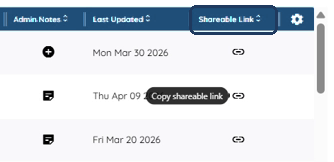
In the Shareable Link column, click the link icon in the candidate's row. When you hover over the icon, you'll see Copy shareable link.
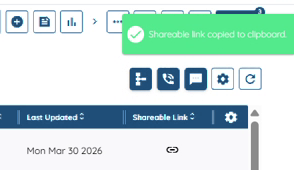
The link is copied to your clipboard and you'll see the message Shareable link copied to clipboard. Paste it wherever you need it, such as an email, a text message, or a proposal for a client.
What clients see when they open the link
The column copies the same shareable link you'd get from the Shareable Link section of the candidate's Profile tab. It opens the same page as View Shareable Version on the candidate's profile, and clients can view it without logging in. Copying the link from the table doesn't change what that page shows.
Related articles
Access the Shareable Link
How to Use the Candidate and Client Shareable Link
Create a Saved Version of a Candidate Shareable Profile
Show Profile Completion in Candidate Table