![enginehire logo thin dark 1.0.png]](https://learn.enginehire.io/hs-fs/hubfs/enginehire%20logo%20thin%20dark%201.0.png?height=40&name=enginehire%20logo%20thin%20dark%201.0.png)
If your Bright Horizons agreement entitles your agency to be paid when a reservation is cancelled close to its start time, EngineHire can apply that for you. It is handled through the cancellation policy on your Bright Horizons booking section. Once it is set up, a cancellation that falls inside the notice window applies the fee to the booking and moves the job to a Late Cancellation status, so late cancellations are captured as they happen instead of being reconstructed at billing time.
Where the setting lives
From the top navigation, go to More → Application & Profile Builder. Find the booking section your agency uses for Bright Horizons reservations, and click the gear icon. Open the Charging & Payments tab.
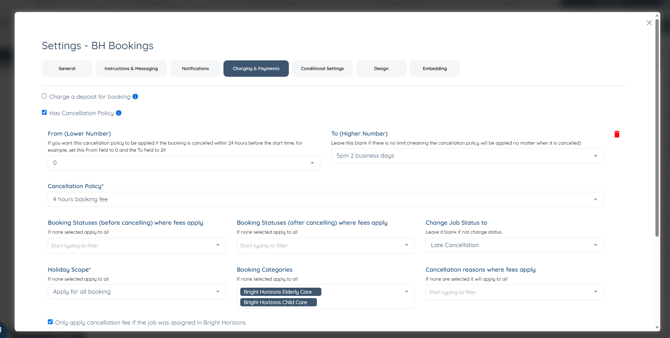
Tick Has Cancellation Policy, then click the + icon to add a policy row. You can add more than one row if your agreement sets different fees at different notice periods.
How the window is measured
Both window fields count backwards from the shift start time. From (Lower Number) is the closest point to the start and To (Higher Number) is the furthest. Setting From to 0 and To to 24 would cover any cancellation made in the final 24 hours before the shift.
If you leave To (Higher Number) blank, the policy applies no matter when the reservation is cancelled.

How the policy is kept to Bright Horizons work
Two settings stop this policy from reaching your other bookings.
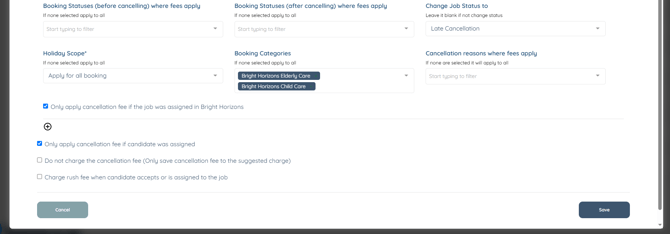
Only apply cancellation fee if the job was assigned in Bright Horizons limits it to reservations that came through the portal. Booking Categories limits it to your Bright Horizons categories, which in the base are Bright Horizons Elderly Care and Bright Horizons Child Care. If your platform uses different category names, select your own, so that the policy matches the bookings you intend it to cover.
Only apply cancellation fee if candidate was assigned is also ticked, so a reservation cancelled before anyone was assigned to it does not attract a fee.
Whether the fee is charged or only recorded
Do not charge the cancellation fee (Only save cancellation fee to the suggested charge) is left unticked in the base, which means the fee is applied to the booking.
Tick it if you would rather the fee was written to the suggested charge for an admin to review before anything is billed. This is the first setting to check if fees are landing on reservations when you expected only a flag, or if you are seeing no charges when you expected them.
What happens after a qualifying cancellation
The fee is applied and the job moves to Late Cancellation. Because that status is distinct from a plain cancellation, you can filter for it on your shift job calendar to see every reservation that was cancelled inside the notice window.
For cancellation fees on bookings that are not Bright Horizons reservations, see Cancellation fees.