![enginehire logo thin dark 1.0.png]](https://learn.enginehire.io/hs-fs/hubfs/enginehire%20logo%20thin%20dark%201.0.png?height=40&name=enginehire%20logo%20thin%20dark%201.0.png)
Let’s get started 🚀
Step 1: Log in to your agent dashboard and click More > Global Settings as shown in the screenshot below.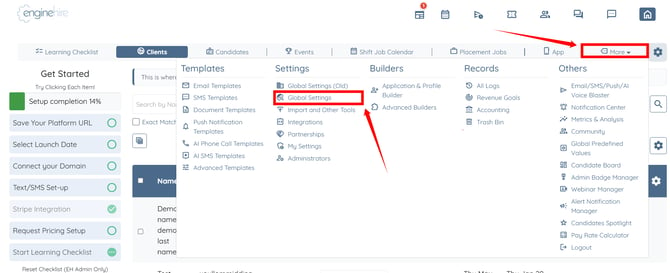
Step 2: Click the References & Experiences option to expand and view its details. 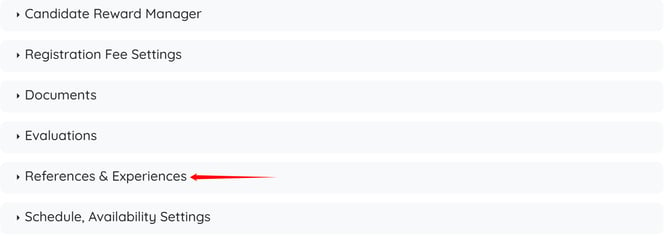
Step 3: Check the Enable hide/show dates toggle on references and experiences (eye icon) checkbox. The settings will be saved automatically.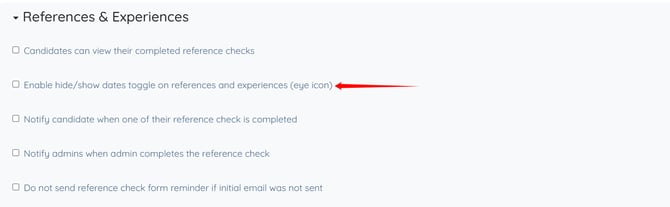
Step 4: Go to the candidate profile shared with the client and click the eye icon for the reference or experience date you want to hide from the client view.
The settings will be saved automatically.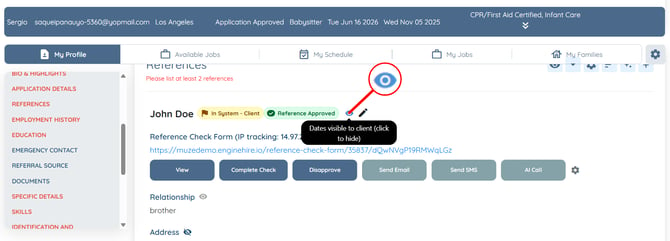
The selected date of the reference or experience will be successfully hidden from the client side.