![enginehire logo thin dark 1.0.png]](https://learn.enginehire.io/hs-fs/hubfs/enginehire%20logo%20thin%20dark%201.0.png?height=40&name=enginehire%20logo%20thin%20dark%201.0.png)
Let’s get started 🚀
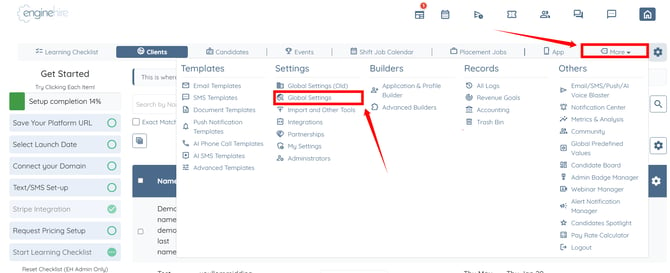
Step 1: Log in to your agent dashboard and click More > Global Settings as shown in the screenshot below.
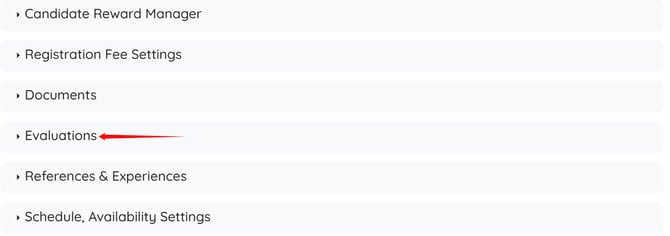
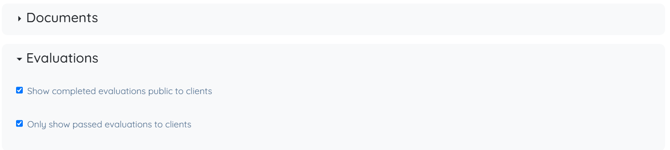
Step 2: Click the Evaluations option to expand and view its details.
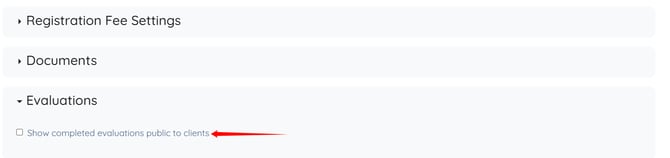
Step 3: Check the Show completed evaluations public to clients checkbox.
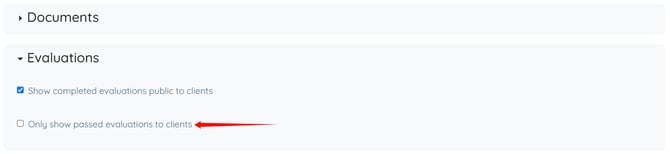
Step 4: Check the Only show passed evaluations to clients checkbox.
The settings will be saved automatically.
Step 1: Log in to your agent dashboard and click More > Global Settings as shown in the screenshot below.
Step 2: Click the Evaluations option to expand and view its details.
Step 3: Check the Show completed evaluations public to clients checkbox.
Step 4: Check the Only show passed evaluations to clients checkbox.
The settings will be saved automatically.
To learn more about creating evaluation builders and assigning them to specific candidate types, refer to the Create an Evaluation Builder article.