![enginehire logo thin dark 1.0.png]](https://learn.enginehire.io/hs-fs/hubfs/enginehire%20logo%20thin%20dark%201.0.png?height=40&name=enginehire%20logo%20thin%20dark%201.0.png)
Let’s get started 🚀
Step 1: Log in to your agent dashboard and click More > Global Settings as shown in the screenshot below.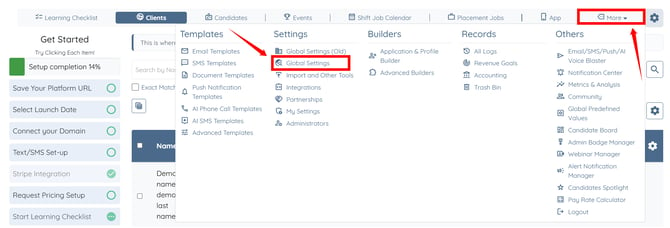
Step 2: Click the Jobs tab from the available tabs.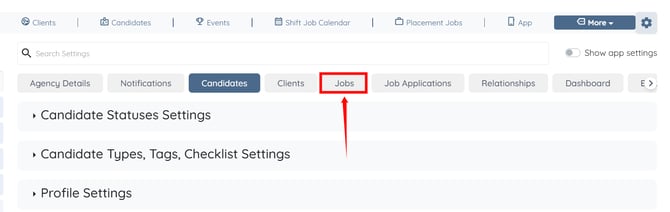
Step 3: Click the Booking Credits option to expand and view its details.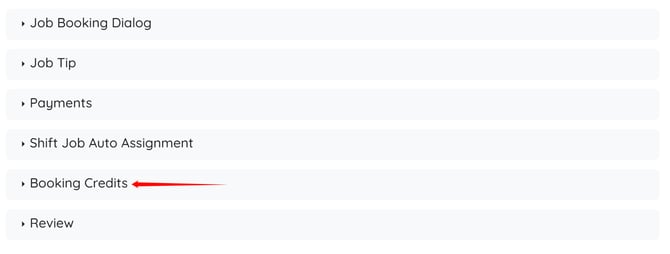
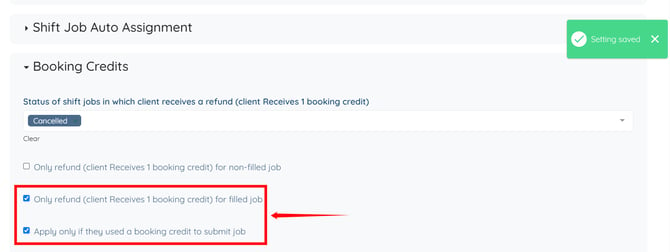
Step 4: Select the shift job status for which clients should receive a booking credit refund from the dropdown list. 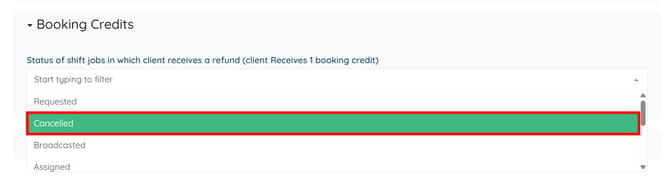
After selecting the status in the previous step, the following set of settings will appear:
-
Only refund (client receives 1 booking credit) for non-filled job: Select this option if you want to issue a refund (1 booking credit) to the client when a job is not filled.
-
Only refund (client receives 1 booking credit) for filled job: Enable this option if you want to provide a booking credit refund when a candidate is successfully assigned to the job.
-
Apply only if they used a booking credit to submit a job: When enabled, clients will only receive a booking credit refund if they originally used a booking credit to submit the job. If no booking credit was used, no refund will be issued.
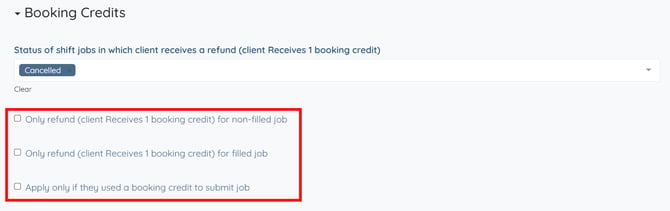
Step 5: Check the applicable refund option(s) as required. The settings will be saved automatically.