![enginehire logo thin dark 1.0.png]](https://learn.enginehire.io/hs-fs/hubfs/enginehire%20logo%20thin%20dark%201.0.png?height=40&name=enginehire%20logo%20thin%20dark%201.0.png)
Your clients and candidates can share referral links from their profiles to refer new people to your agency. Without notifications, the only way to know a link was used is to check your referral records yourself. The Emails that receive a notification when a referral link is used setting emails the addresses you choose whenever a referral link is used, so your team can follow up right away.
This only applies if your clients and candidates have referral links. If they don't yet, see Referral Codes For Clients And Candidates and Allow Cross-Role Referrals for Candidates and Clients.
Choose who gets notified when a referral link is used
From your agent dashboard, click More, then Global Settings.
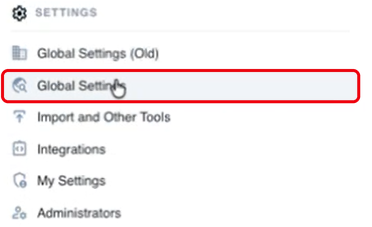
Type referral link in the search bar at the top of the page. The Emails that receive a notification when a referral link is used setting appears under Preferences on the Agency Details tab.

Enter the email address that should receive the notifications. To notify more people, click Add and enter another address. To stop notifying someone, click the trash icon next to their address. Your changes save automatically.
This is a global setting, so these addresses are notified for every client's and candidate's referral link.
Where clients and candidates find their referral links
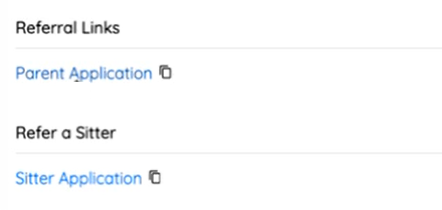
Each client and candidate profile has a Referral Links section with the links they can share, and the copy icon next to each link copies it. In this client's profile, Parent Application refers a new client and Sitter Application, under Refer a Sitter, refers a new candidate. The links you see depend on which referral options your agency has turned on.
To review all your referrals in one place, go to More > All Logs > Referral Records. For details, see Track Candidate Referral Records.
Related articles
Referral Codes For Clients And Candidates
Allow Cross-Role Referrals for Candidates and Clients
Track Candidate Referral Records
Use The Setting Search Bar To Find Features And Select Or Update Settings